
The Responsive Addons for Elementor (RAE) Posts widget allows you to quickly display posts on any page of your website.

Content
Layout

- 1.Skin: Select one of the skin type for Posts layout from Classic, Cards, or Full Content.
- 2.Columns: Select the 1 to 6 number of columns to be displayed in a row.
- 3.Posts Per Page: Select the number of posts to be displayed on the page.
- 4.Image Position: Select position as Top, Left, or Right for the featured image from the post. Select None if you wish to not display the featured image.
- 5.Masonry: Enable this option to display posts in a masonry format.
- 6.Image Size: Select size for the featured image.
- 7.Image Ratio: Select the height/width ratio for the featured image.
- 8.Image Width: Select width for the featured image. Height will be decided according to the selected image ratio.
- 9.Title: Toggle this button to show or hide the post title.
- 10.Title HTML Tag: Select the HTML tag in which the post title will be displayed.
- 11. Excerpt: Enable this button to show excerpt instead of full post text.
- 12.Excerpt Length: Provide the length of the excerpt.
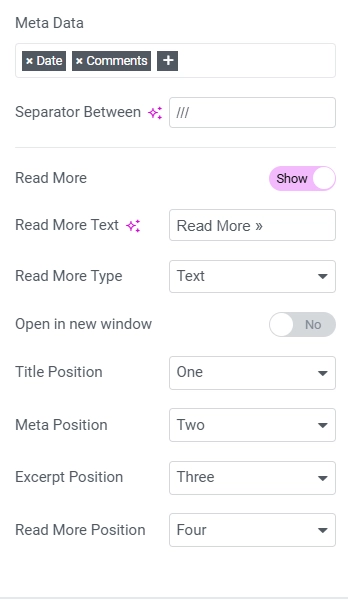
- 13.Meta Data: Select which metadata elements to be displayed with the post. You can select from the Author, Date, Time, Comments.
- 14.Read More: Toggle this button to display the Read More link with the post.
- 15.Read More Text: Provide the read more text which will be displayed with the post.
- 16.Open in new window: Enable if read more link should open a complete post in the new tab.
Query

- 1.Source: Select source for displaying posts. You can select from the Posts, Pages, Manual Selection, Current Selection, Related.
- 2.Include / Exclude: Select which posts to be included or excluded. Include By: To include posts you can select posts by Author, Term. Exclude By: Select to exclude posts by Current post, Manual Selection, Term, Author. Avoid Duplicates: If set to Yes duplicate posts will not be displayed in the frontend, however, while editing you can see such duplicate posts. Offset: Use this value to skip the number of starting posts from displaying.
- 3.Date: You can select to display posts according to the publish date. Customize the date by selecting from multiple options.
- 4.Order By: Order display of posts by Date, Title, Menu Order, or Random.
- 5.Ignore sticky posts: Enable to not display sticky posts.
- 6.Query ID: Give your Query a custom unique id to allow server-side filtering.
Pagination

- 1.Pagination: Select style of pagination as Numbers, Previous/Next, Numbers + Previous/Next, or none.
- 2.Page Limit: Provide how many pages to be displayed.
- 3.Previous Label & Next Label: Provide text for labels when pagination style contains previous/next links.
- 4.Alignment: Select alignment for the pagination.
Style
Layout

- 1.Column Gap: Select space between columns.
- 2.Rows Gap: Select space between rows.
- 3.Alignment: Select alignment for the layout.
Box

- 1.Border Width: Provide width for top, right, bottom, left side of the box border.
- 2.Border Radius: Radius for the box border.
- 3.Padding: Provide padding for the top, right, bottom, left side of the box.
- 4.Content Padding: Provide padding for top, right, bottom, left side of the box content.
- 5. Box Shadow: Select different options for Box Shadow as Color, Horizontal, Vertical, Blur, Spread, Position. You can select different options for normal and hover behavior of the box.
- 6.Background Color: Select background Color & Opacity for normal and hover behavior of the box.
- 7.Border Color: Select border Color & Opacity for normal and hover behavior of the box.
Image

- 1.Border Radius: Radius for the image border.
- 2.Spacing: Space around the image.
- 3.CSS Filters: Apply a combination of different CSS filters like Blur, Brightness, Contrast, Saturation, Hue. You can select the different settings for Normal & Hover settings.
Content

- 1.Title Color: Color of the title. Typography: Select typography options as font-family, size, weight, transform, style, decoration, line-height, letter-spacing. Spacing: Space around the content.
- 2.Meta Color: Color of the meta. Separator color: Color of the ‘meta separator’. Typography: Select typography options as font-family, size, weight, transform, style, decoration, line-height, letter-spacing. Spacing: Space around the content.
- 3.Excerpt Color: Color of the excerpt. Typography: Select typography options as font-family, size, weight, transform, style, decoration, line-height, letter-spacing. Spacing: Space around the excerpt.
- 4.Read More Color: Color of the Read More. Typography: Select typography options as font-family, size, weight, transform, style, decoration, line-height, letter-spacing. Spacing: Space around the read more link.


