

↓ Skip to Main Content
Cyberchimps Logo

Main Navigation

  • Products
    • Responsive Theme
    • Responsive Plus Plugin
    • Responsive Addons for Elementor
    • Responsive Blocks Plugin
  • Starter Templates
    • Free Templates
    • Premium Templates
  • For Agencies
  • Pricing
  • Login
Get Started
Cyberchimps Logo

Off Canvas Menu

  • Products
    • Responsive Theme
    • Responsive Plus Plugin
    • Responsive Addons for Elementor
    • Responsive Blocks Plugin
  • Starter Templates
    • Free Templates
    • Premium Templates
  • For Agencies
  • Pricing
  • Login

Installation & Updates

1
  • How to Install & Activate the Responsive Addons for Elementor

Widgets

91
  • Animations Extension
  • RAE Duplicator
  • Product Related
  • RAE Product Data Tabs
  • Stacking Cards
  • Before After Image Slider
  • Image Gallery
  • Advanced Tabs
  • Archive Posts
  • Archive Title
  • Audio Player
  • Author Box
  • Banner
  • Breadcrumbs
  • Business Hour
  • Button
  • Contact Form 7 Styler
  • Call To Action
  • Custom Add To Cart
  • Content Switcher
  • Countdown
  • Facebook Feed
  • ย Data Table
  • Divider
  • Dual Color Header
  • FAQ
  • FlipBox
  • Featured Image
  • Feature List
  • Fancy Text
  • Icon Box
  • Gravity Forms Styler
  • Google Map
  • Image Hotspot
  • LearnDash Course List
  • Lottie
  • Logo Carousel
  • Mailchimp Styler
  • Login & Register
  • Media Carousel
  • Menu Cart
  • Modal Popup
  • MultiButton
  • Nav Menu
  • OffCanvas
  • Portfolio
  • Post Comments
  • Post Content
  • Post Excerpt
  • Post Info
  • Post Navigation
  • Post Title
  • Posts
  • Post Carousel
  • Price Box
  • Price List
  • ย Pricing Table
  • Product Carousel
  • Product Category Grid
  • Products
  • Progress Bar
  • Reviews
  • Search Form
  • Site Logo
  • Slider
  • Sticky Section
  • Sticky Video
  • Table of Contents
  • Team Member
  • Testimonial Slider
  • Theme Builder
  • Timeline
  • Twitter Feed
  • Video
  • WooCommerce Breadcrumbs
  • WP Forms Styler
  • One Page Navigation
  • Content Ticker
  • Woo Checkout
  • Back to Top
  • Particle Backgrounds for Elementor
  • Product Price
  • Product Image
  • Product Stock
  • Product Upsells
  • Product Meta
  • Product Title
  • Product Rating
  • Product Content
  • Product Short Description
  • Product Additional Information
View Categories
  • Home
  • Docs
  • Responsive Addons For Elementor
  • Widgets
  • Divider

Divider

Fancy dividers

Responsive Addons for Elementor (RAE) Divider widget allows you to use various fancy dividers that supports text, icon, and images.

Content

Divider
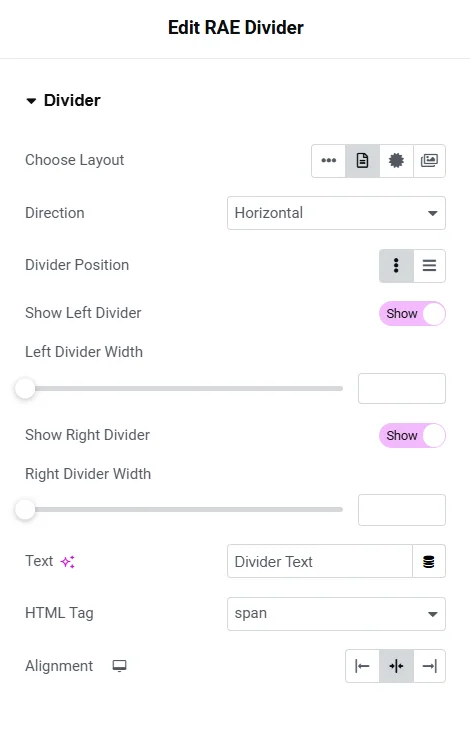
Content divider
  1. 1.Choose Layout – Set the layout for the divider. Available options are Plain, Text, Icon, and Image.
  2. 2.Direction – Set the direction of the divider. Available options are Horizontal and Vertical.
  3. 3.Alignment – Set the alignment of the divider.
  4. 4.Divider Position – Set the divider position. Available options are Inline and Block. This setting is available if Choose Layout is not set to Plain.
  5. 5.Show Left Divider – Show/Hide the left part of the divider. This setting is available if Choose Layout is not set to Plain.
  6. 6.Left Divider Width – Set the width of the left part of the divider. This setting is available if Choose Layout is not set to Plain.
  7. 7.Show Right Divider – Show/Hide the right part of the divider. This setting is available if Choose Layout is not set to Plain.
  8. 8.Right Divider Width – Set the width of the right part of the divider. This setting is available if Choose Layout is not set to Plain.
  9. 9.Text – Add the text to be displayed between the divider. This setting is available if Choose Layout is set to Text.
  10. 10.HTML Tag – Set the HTML tag for text. This setting is available if Choose Layout is set to Text.
  11. 11.Icon – Choose the icon to be displayed between the divider. This setting is available if Choose Layout is set to Icon.
  12. 12.Image – Choose the image to be displayed between the divider. This setting is available if Choose Layout is set to Image.

Style

Divider

Style divider
  1. 1.Vertical Alignment – Set the vertical alignment for the divider. This setting is available if Choose Layout is not set to Plain.
  2. 2.Style – Select the divider style. Available options are Solid, Dashed, Double, and Dotted.
  3. 3.Height – Set the height of the divider.
  4. 4.Width – Set the width of the divider.
  5. 5.Divider Color – Set the color of the divider. If Choose Layout is not set to Plain then the color for the left and right part of the divider can be set under Before and After tabs respectively.

Text
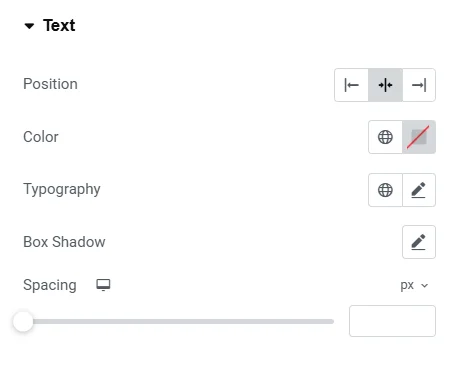
Style text

This section is available if Choose Layout is set to Text.

  1. 1.Position – Set the position for the text. Available options are Left, Middle, and Right.
  2. 2.Color – Set the text color.
  3. 3.Typography – Set the typography settings for the text.
  4. 4.Box Shadow – Set the box shadow properties for the text.
  5. 5.Spacing – Set the spacing for the text.
Updated on February 26, 2025

What are your Feelings

  • Happy
  • Normal
  • Sad

Share This Article :

  • Facebook
  • X
  • LinkedIn
  • Pinterest
ย Data TableDual Color Header

Our Products

Responsive Paid Plan

Responsive Plus

Responsive Addons for Elementor

Starter Templates

Responsive Blocks

WP Legal Pages

GDPR Cookie Consent

Powered by Responsive WordPress theme

Our Products

Responsive Paid Plan

Responsive Plus

Responsive Addons for Elementor

Starter Templates

Responsive Blocks

WP Legal Pages

GDPR Cookie Consent

Powered by Responsive WordPress theme

Resources

Starter Templates

Responsive Platform

Learn Elementor

Testimonials

Compare Astra/Kadence

TrustPilot

CCPA

Video Tutorials

Resources

Starter Templates

Responsive Platform

Learn Elementor

Testimonials

Compare Astra/Kadence

TrustPilot

CCPA

Video Tutorials

Theme Features

Responsive Features

WooCommerce

Header Footer Builder

Site Builder

Child Theme Generator

Download Free Theme

DFY Website Setup

Theme Features

Responsive Features

WooCommerce

Header Footer Builder

Site Builder

Child Theme Generator

Download Free Theme

DFY Website Setup

Company

About

Pricing

Blog

Brand Assets

Affiliate Program

Contact Us

Terms of Service

GDPR Privacy Policy

GDPR Cookie Policy

Website Design Service

Company

About

Pricing

Blog

Brand Assets

Affiliate Program

Contact Us

Terms of Service

GDPR Privacy Policy

GDPR Cookie Policy

Website Design Service

Support

Login

Whatโ€™s New

Documentation

Request Support

Video Tutorials

Refund Policy

Service

Discount Coupon

Bug Bounty Program

Support

Login

Whatโ€™s New

Documentation

Request Support

Video Tutorials

Refund Policy

Service

Discount Coupon

Bug Bounty Program

Copyright © 2010-2026 CyberChimpsย ย 

Copyright © 2010-2026 CyberChimpsย ย 

Top
Top