
↓ Skip to Main Content
Cyberchimps Logo

Main Navigation

  • Products
    • Responsive Theme
    • Responsive Plus Plugin
    • Responsive Addons for Elementor
    • Responsive Blocks Plugin
  • Starter Templates
    • Free Templates
    • Premium Templates
  • For Agencies
  • Pricing
  • Login
Get Started
Cyberchimps Logo

Off Canvas Menu

  • Products
    • Responsive Theme
    • Responsive Plus Plugin
    • Responsive Addons for Elementor
    • Responsive Blocks Plugin
  • Starter Templates
    • Free Templates
    • Premium Templates
  • For Agencies
  • Pricing
  • Login

Theme Installation & Updates

7
  • How to Delete a WordPress Theme
  • Precautions to take while working with a child theme
  • How to Create Your Account on Cyberchimps Responsive
  • FIX: Uploaded-file-exceeds-the-upload_max_filesize
  • Getting Error โ€“ The theme is missing the style.css stylesheet?
  • How to Install Responsive Theme
  • How to Download & Install Responsive Starter Template Plugin?

Responsive Theme Walkthrough

23
  • Blog/Archive Settings
  • Single Post Settings
  • Page Settings
  • Global Settings – Colors and Backgrounds
  • Global Settings – Form Fields
  • Global Settings – Button
  • How to Load Google Fonts Locally
  • How to Add Sidebar in Responsive Theme
  • Header and Footer Scripts in theme customizer
  • Global Typography Settings in Responsive Theme
  • Show Last Updated or Published Dates on Your Blog Posts
  • Create a Header Using Responsive Theme’s Header Builder
  • Create a Footer Using Responsive Themeโ€™s Footer Builder
  • Responsive Theme Typography Presets
  • How To Create A Sticky Header Using Cyberchimps Responsive Theme
  • How To Change The Copyright Footer Text In WordPress
  • How To Change Breadcrumbs Icon in Responsive Theme
  • How to adjust the width of sidebars from the customizer
  • Resize Logo From Theme Customizer
  • How to Add Breadcrumbs Using Responsive Theme?
  • Responsive Theme Settings
  • How to Add Related Posts Using Responsive Theme
  • Responsive Theme Widgets

FAQ

8
  • How To Enable Debug Log In WordPress
  • Download A .zip File Without Unzipping In Safari
  • How To Create An Admin User For Support In WordPress
  • Upgrading to 4.0.0 +
  • Upgrading to 4.1
  • Facing issues in importing Yoga Instructor Pro?
  • Yoast Seo Breadcrumb support in the theme
  • Updating to 4.2.0 results in the blank front end

Pre Sales / Billing FAQ

2
  • Billing FAQ
  • Pre Sales FAQ

Header Builder

12
  • How To Create Mobile Header With Responsive Theme’s Header Builder
  • How to Activate Live Search
  • Secondary Menu
  • HTML
  • Contact Info
  • Header Widgets
  • Header Social
  • Cart
  • Header Button
  • Search
  • Site Title and Logo
  • Primary Menu

Footer Builder

5
  • Footer Widgetsย 
  • Social
  • Scroll To Top
  • Copyright
  • Footer Menu
View Categories
  • Home
  • Docs
  • Responsive Theme
  • Header Builder
  • Secondary Menu

Secondary Menu

Secondary menu

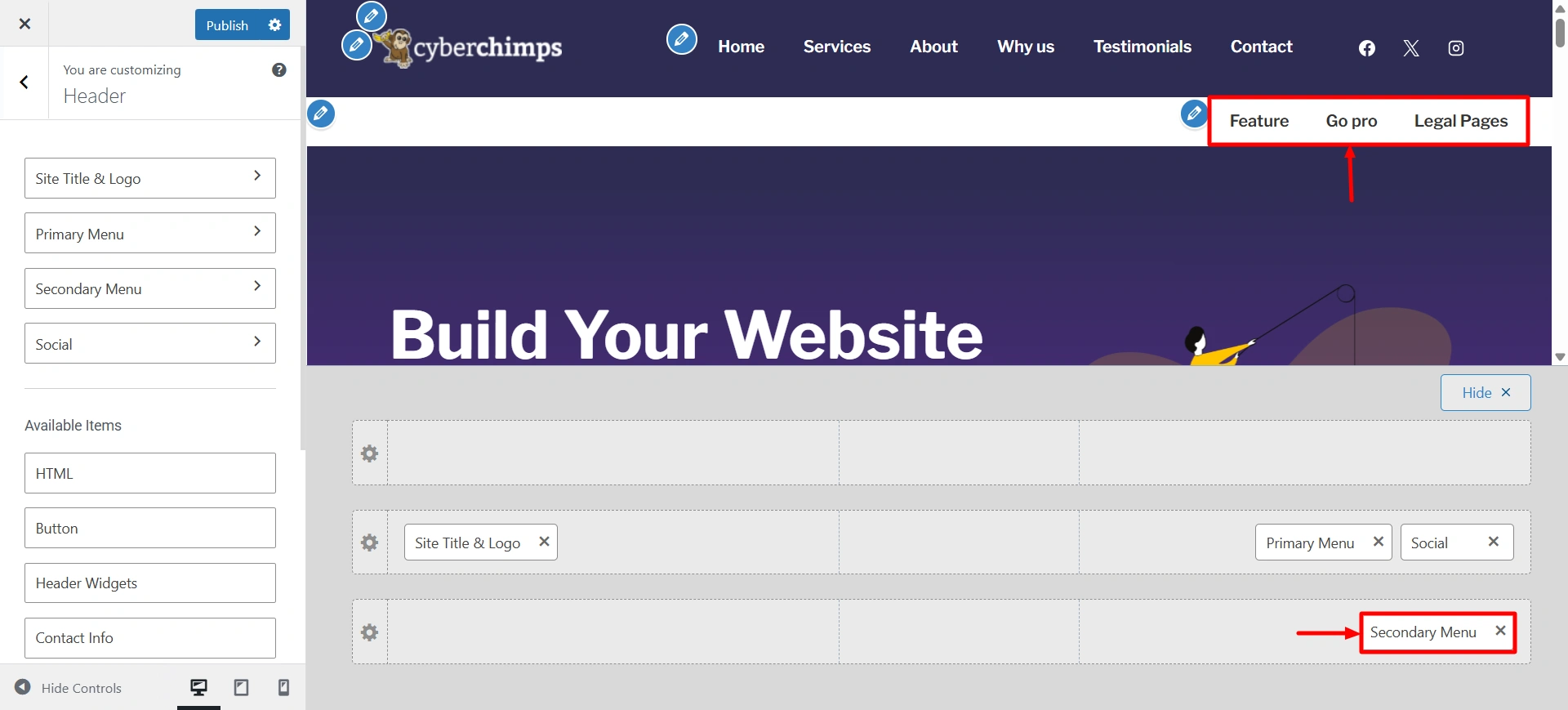
The Secondary Menu settings allow you to add an extra navigation menu to the header of your site. This additional menu is perfect for quickly displaying links such as contact pages, login/register, language switchers, or promotional links without crowded navigation.

Using these options means that you can help create a clean and organized header that helps to try and help the user navigate your site and improve usability.

Go to Customize > Header > Secondary menu.

Here are some of the settings options that are present in the secondary menu.
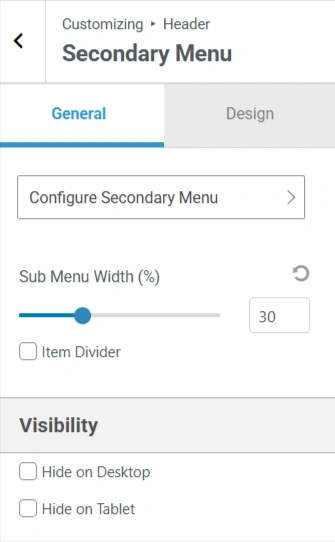
General settings

General settings

  • Configure Secondary Menu: A button that, when clicked, likely navigates the user to a panel for adding and managing menu items.
  • Sub Menu Width (%): Control the width of any sub-menus within the secondary menu.
  • Item Divider: Display a divider line between menu items.
  • Visibility: Control the menu’s visibility on different devices.
General settings

  • Configure Secondary Menu: A button that, when clicked, likely navigates the user to a panel for adding and managing menu items.
  • Sub Menu Width (%): Control the width of any sub-menus within the secondary menu.
  • Item Divider: Display a divider line between menu items.
  • Visibility: Control the menu’s visibility on different devices.
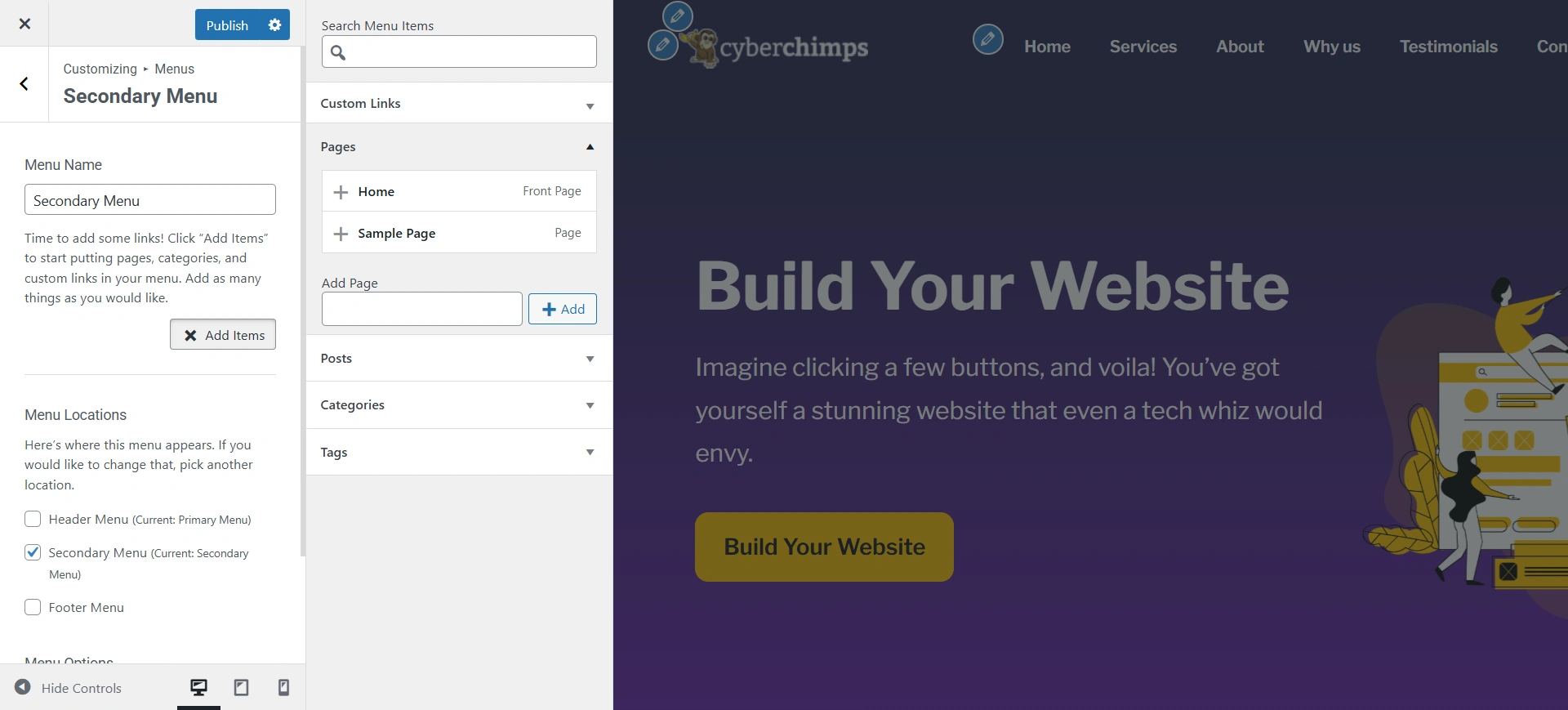
settings of secondary menu
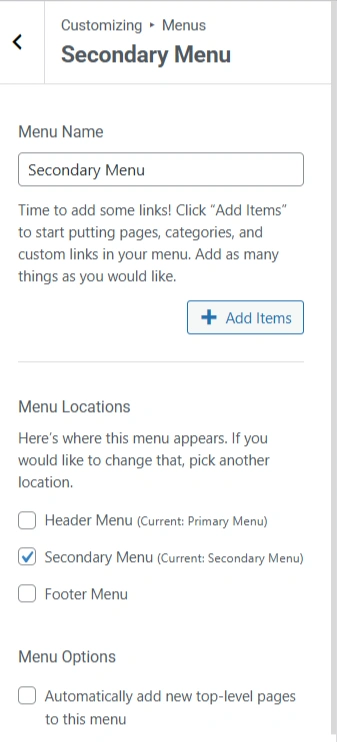
  • Menu Name: Write the menu name you want for your menu.
  • Menu Locations: Select the place you want to display it.

When you are done filling in these fields, click ‘Add Items’.

Secondary menu

Add the pages you want in your secondary menu.
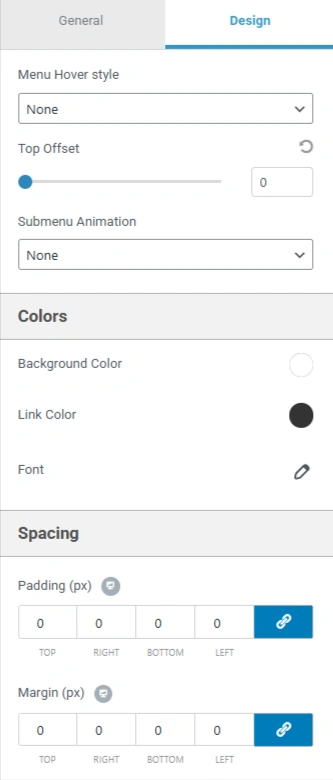
Design setting

Design Settings

  • Menu Hover style: Select the style that appears when a user hovers over a menu item.
  • Top Offset: Adjust the vertical position of the menu.
  • Submenu Animation: Choose the animation for sub-menus (Slide up, fade, or slide down).

Colors:

  • Background Color: Set the background color of the secondary menu.
  • Link Color: Add the colour to the text of the menu links.
  • Font: Access detailed font and typography settings.

Spacing:

  • Padding (px): Set the padding for your secondary menu.
  • Margin (px): Set the margin for your secondary menu.
Updated on June 22, 2026

What are your Feelings

  • Happy
  • Normal
  • Sad

Share This Article :

  • Facebook
  • X
  • LinkedIn
  • Pinterest
How to Activate Live SearchHTML

Our Products

Responsive Paid Plan

Responsive Plus

Responsive Addons for Elementor

Starter Templates

Responsive Blocks

WP Legal Pages

GDPR Cookie Consent

Powered by Responsive WordPress theme

Our Products

Responsive Paid Plan

Responsive Plus

Responsive Addons for Elementor

Starter Templates

Responsive Blocks

WP Legal Pages

GDPR Cookie Consent

Powered by Responsive WordPress theme

Resources

Starter Templates

Responsive Platform

Learn Elementor

Testimonials

Compare Astra/Kadence

TrustPilot

CCPA

Video Tutorials

Resources

Starter Templates

Responsive Platform

Learn Elementor

Testimonials

Compare Astra/Kadence

TrustPilot

CCPA

Video Tutorials

Theme Features

Responsive Features

WooCommerce

Header Footer Builder

Site Builder

Child Theme Generator

Download Free Theme

DFY Website Setup

Theme Features

Responsive Features

WooCommerce

Header Footer Builder

Site Builder

Child Theme Generator

Download Free Theme

DFY Website Setup

Company

About

Pricing

Blog

Brand Assets

Affiliate Program

Contact Us

Terms of Service

GDPR Privacy Policy

GDPR Cookie Policy

Website Design Service

Company

About

Pricing

Blog

Brand Assets

Affiliate Program

Contact Us

Terms of Service

GDPR Privacy Policy

GDPR Cookie Policy

Website Design Service

Support

Login

Whatโ€™s New

Documentation

Request Support

Video Tutorials

Refund Policy

Service

Discount Coupon

Bug Bounty Program

Support

Login

Whatโ€™s New

Documentation

Request Support

Video Tutorials

Refund Policy

Service

Discount Coupon

Bug Bounty Program

Copyright © 2010-2026 CyberChimpsย ย 

Copyright © 2010-2026 CyberChimpsย ย 

Top
Top