↓ Skip to Main Content
Cyberchimps Logo

Main Navigation

  • Pro
  • Starter Templates
    • Free Templates
    • Premium Templates
  • Pricing
  • Login
Get Started
Cyberchimps Logo

Off Canvas Menu

  • Pro
  • Starter Templates
    • Free Templates
    • Premium Templates
  • Pricing
  • Login

Modules & Settings

9
  • AI Suite in Responsive Pro
  • How to White Label Responsive Theme
  • Usage Tracking Policy
  • Create a Mega Menu with the Responsive Pro
  • Custom Fonts
  • WooCommerce Module
  • Site Builder
  • How to Connect to New License If I Am An Old Responsive Pro User
  • Your Site Doesn’t Have A Default Kit

WooCommerce

5
  • Product Catalog
  • WooCommerce Product Catalog Options
  • WooCommerce Cart Options
  • WooCommerce Single Product
  • WooCommerce Module Overview
View Categories
  • Home
  • Docs
  • Responsive Plus - Starter Template
  • WooCommerce
  • WooCommerce Product Catalog Options

WooCommerce Product Catalog Options

The Responsive Theme offers WooCommerce Product Catalog Options to give you complete control over the aesthetics of your shop and product listing pages. 

With such options, you can create a catalog that matches your brand style, improves user experience, and helps boost conversions.

So let’s learn what these WooCommerce Product Catalog page settings have to offer.

General Settings

  • Breadcrumbs: You can enable or disable breadcrumbs using the toggle, which shows the user’s path through the website.
  • Toolbar: You can enable or disable the toolbar using the toggle, which shows the user’s path through the website.
  • Content Alignment: You can align the main content on your product catalog page to the right, left, and centre.
  • Main Content Width: A slider is provided to adjust the width of the main content area.

Product Card Spacing:

  • Padding: Fields to set the padding for the product cards in pixels, with separate values for top, right, bottom, and left. A link icon indicates that the values can be linked together.
  • Margin: Fields to set the margin for the product cards in pixels, with separate values for top, right, bottom, and left. A link icon indicates that the values can be linked together.

These are the default settings of the product catalog options. I have disabled the toolbar toggle and changed the alignment to centre.
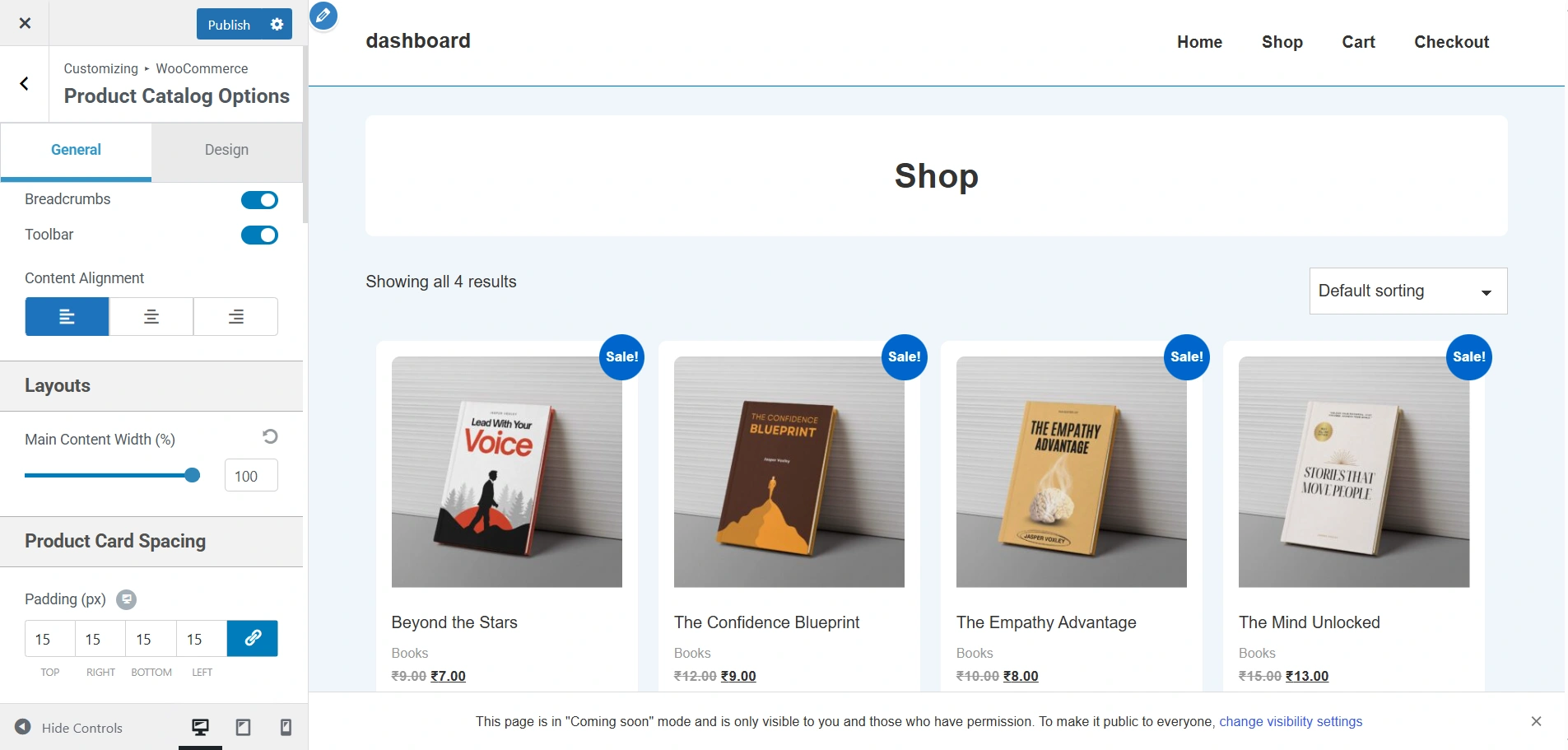
default settings

This is how you’ll be able to view it.
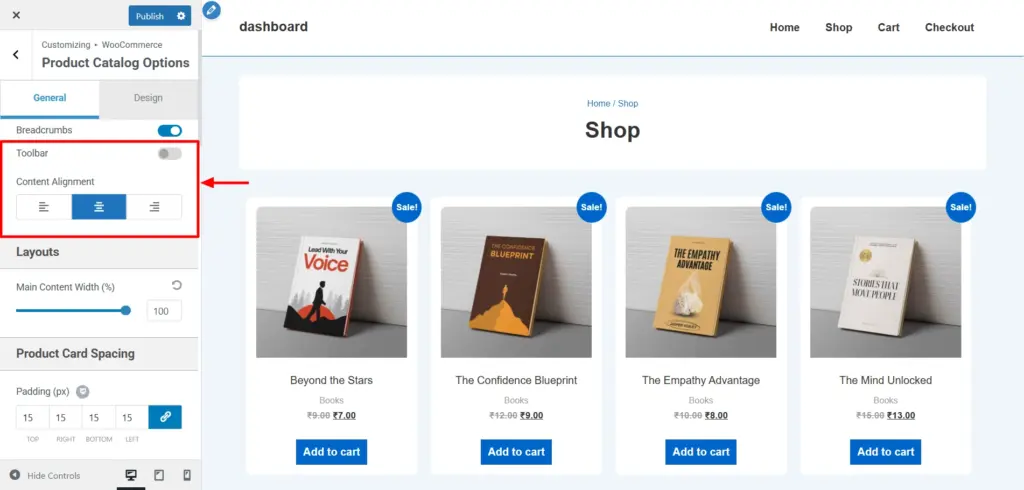
product catalog options

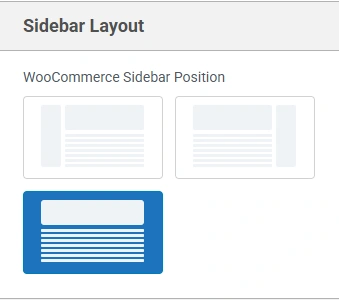
Sidebar Layout

You have the option of choosing the layout of the sidebar on single product pages, i.e., left, right, and none.

The default settings do not come with a sidebar. That’s why I have selected the left sidebar for my product catalogs options. This is how it looks on the live viewer.
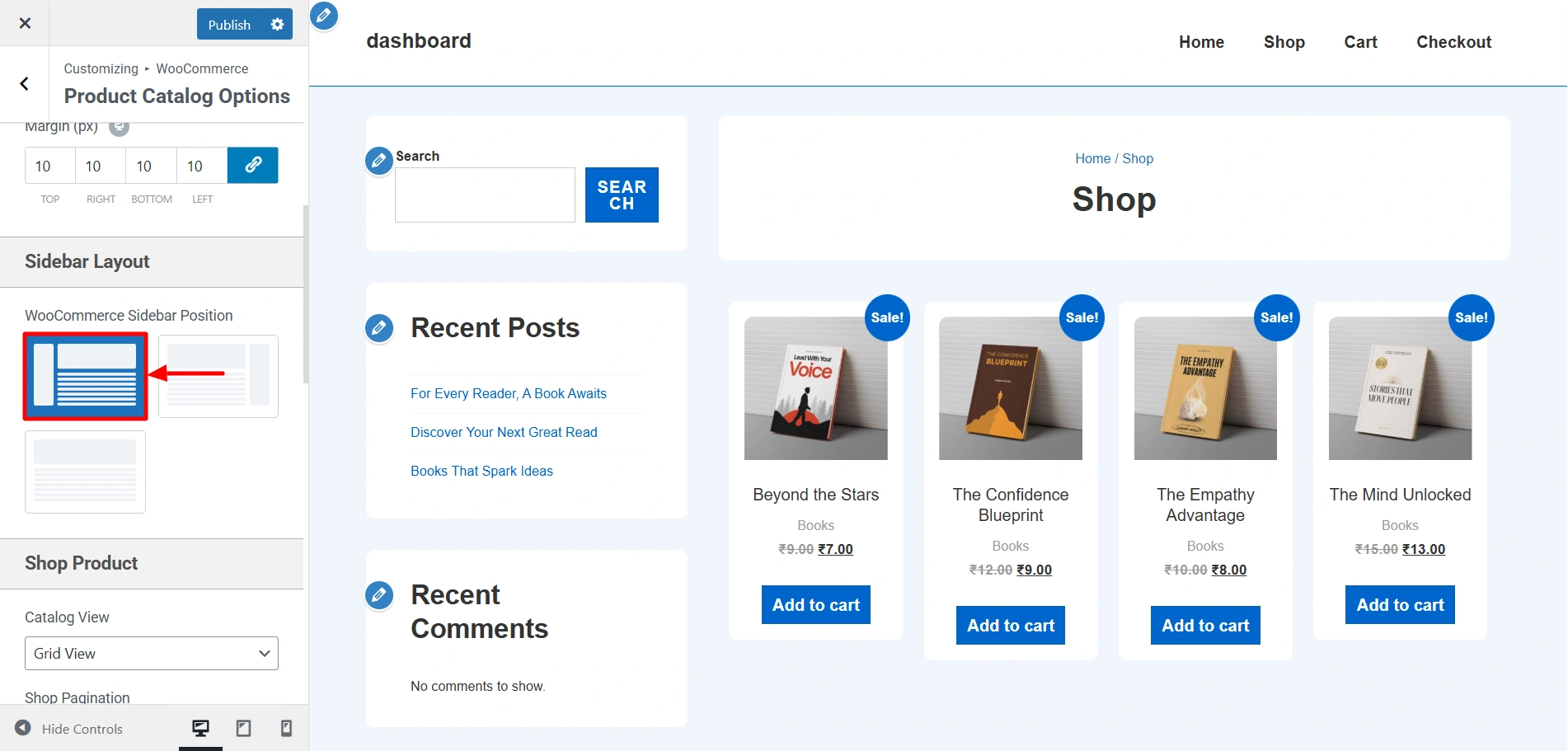
sidebar

Shop Product Settings

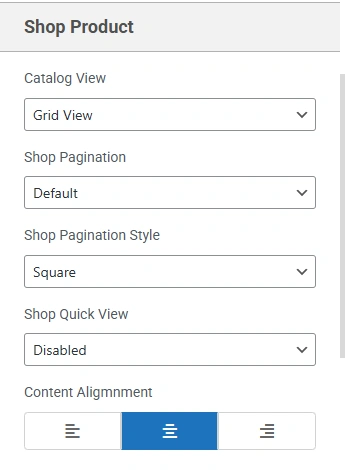
  • Catalog View: You get a dropdown to select the display style for the product catalog,i.e., List and Grid View
  • Shop Pagination: A dropdown menu to select the pagination style for the shop pages,i.e., Default and infinite. 
  • Shop Pagination Style: A dropdown menu to select the visual style of the pagination,i.e., square or circle.
  • Shop Quick View: A dropdown menu to enable or disable a quick view feature for products, i.e., on image, on image click, after summary, and disabled.
  • Content Alignment: You can align the content of the product items to the right, left, and centre.

This was how the Products Catalog page looked before. It had a grid layout, left alignment to content, and default pagination.
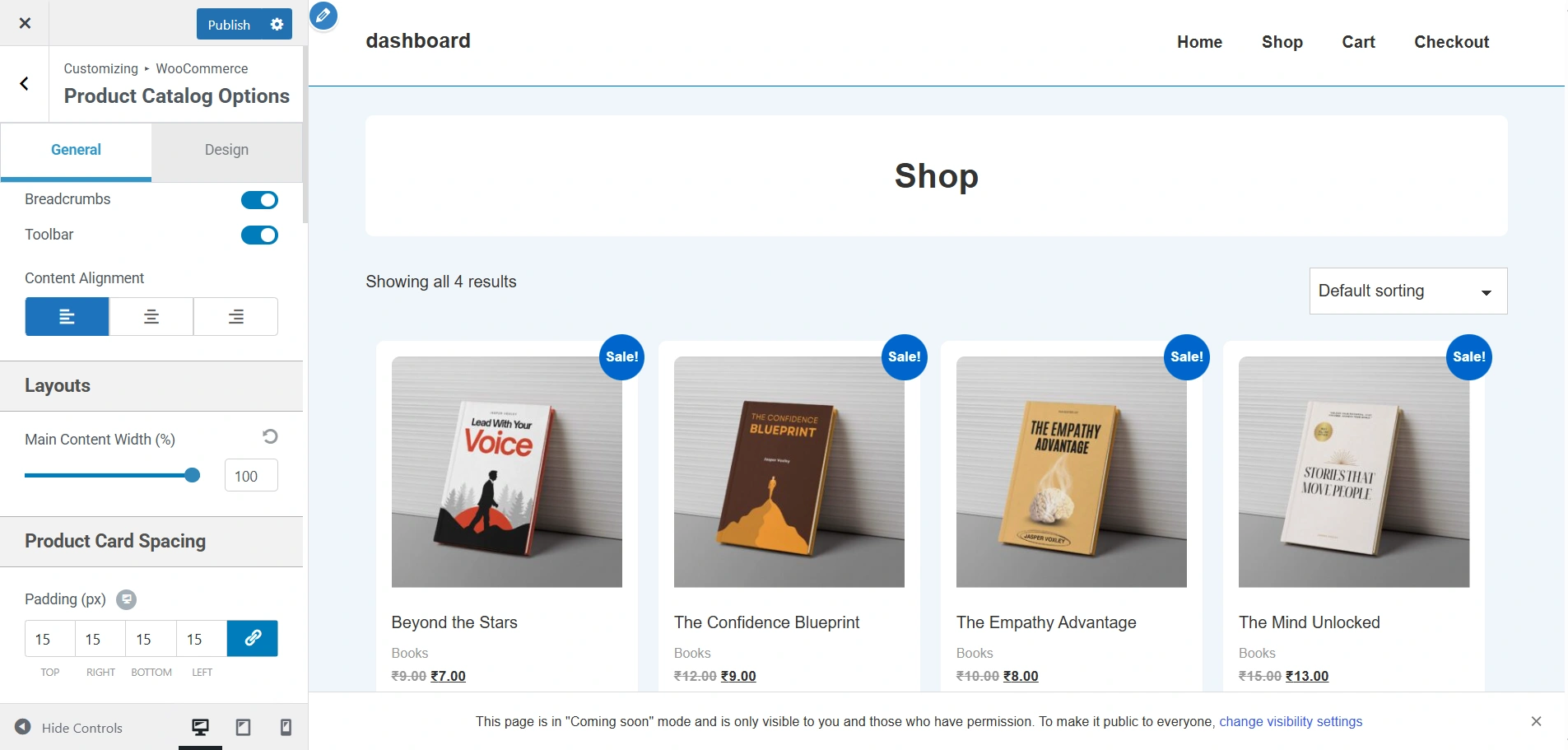
default page

After changing the catalog view to list view, shop pagination to infinite, content alignment to centre, and other changes here and there, this is the result. According to your business needs, you can choose between the grid view and list view to showcase your products.
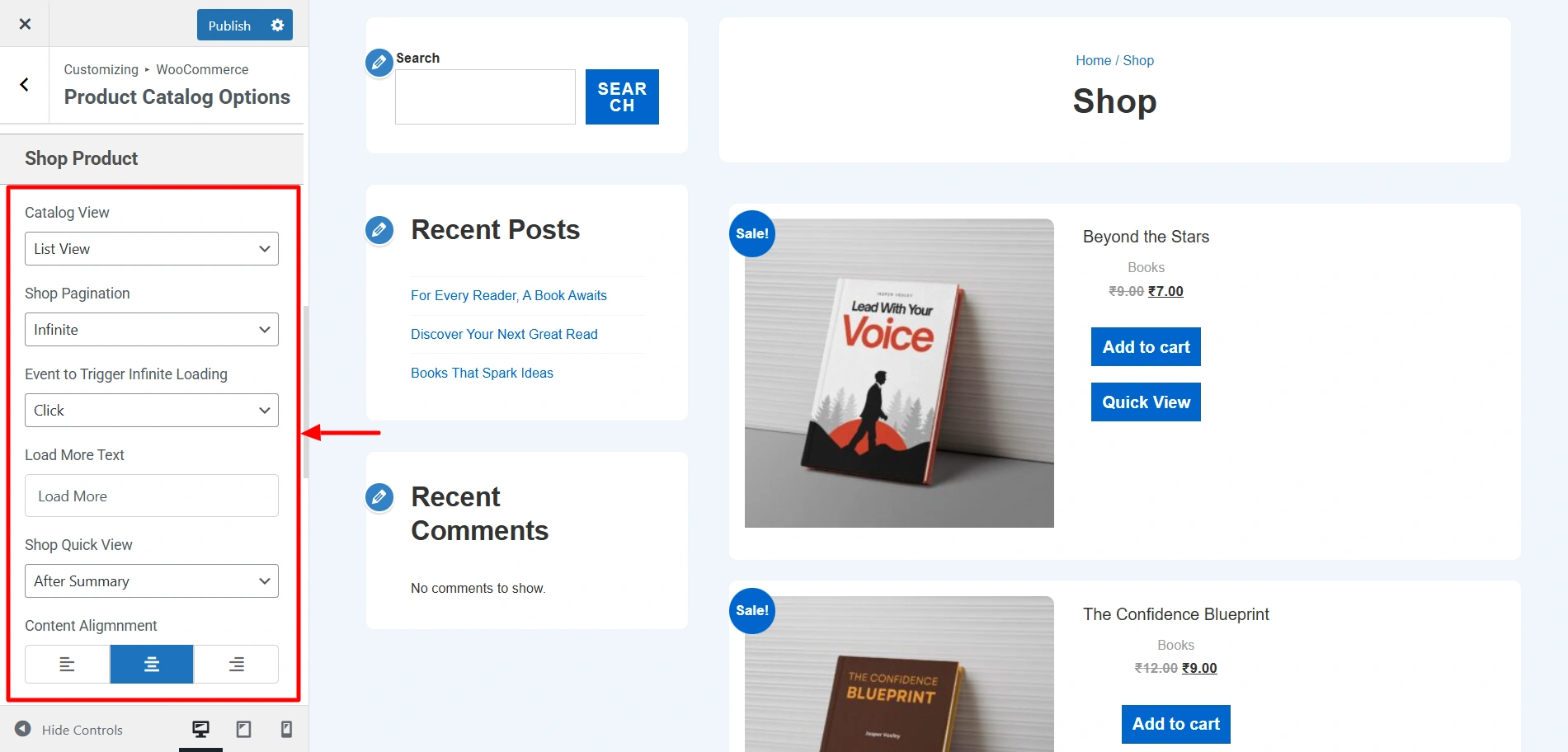
Product catalog page
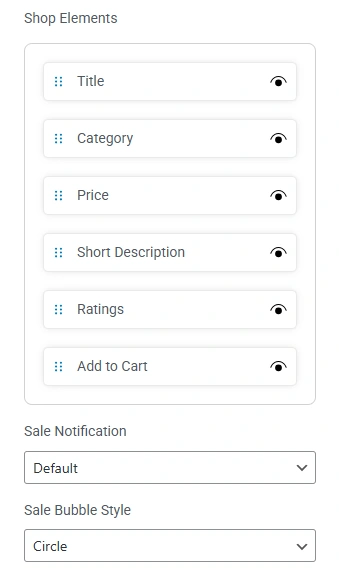
  • Shop Elements: This drag-and-drop section lets you reorder or toggle different product page elements, such as title, category, rating, and more. Each element can be shown/hidden by clicking the eye icon.
  • Sale Notification: A dropdown menu to select the style of the sale notification, i.e, default, custom string, and none.
  • Sale Bubble Style: A dropdown menu to choose the shape of the sale notification bubble.

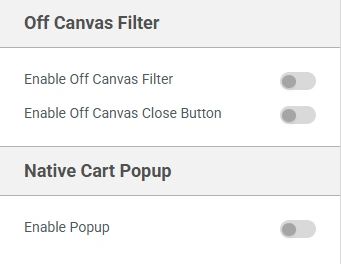
Off Canvas Filter:

  • Enable Off Canvas Filter: You can enable or disable a filter that slides in from the side using the provided toggle.
  • Enable Off Canvas Close Button: You can enable or disable a close button for the off-canvas filter using the provided toggle.

Native Cart Popup:

  • Enable Popup:  You can enable or disable a pop-up that appears when a user adds a product to their cart using the provided toggle.

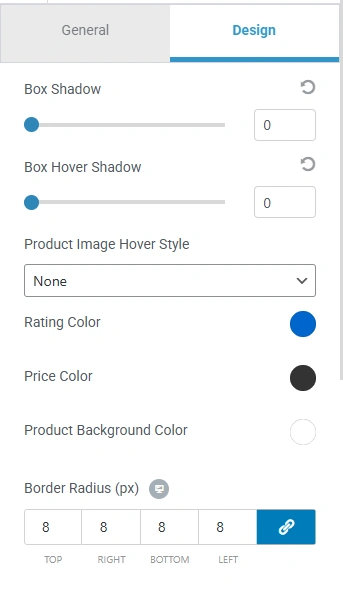
Design Settings

  • Box Shadow: You can control the shadow effect around product boxes using the slider provided.
  • Box Hover Shadow: You can control the shadow effect that appears when a user hovers over a product box using the slider.
  • Product Image Hover Style: A dropdown menu to select the effect applied to the product image on hover, i.e., swap images, fade, zoom, zoom fade, or none.
  • Rating Color: A color picker to choose the color of the star ratings. The current color is blue.
  • Price Color: Choose the color of the product price text using the colour picker. 
  • Product Background Color: Choose the background color for the product card using the color picker.
  • Border Radius: Set the roundness of the corners for product boxes by entering values for the top, right, bottom, and left corners.

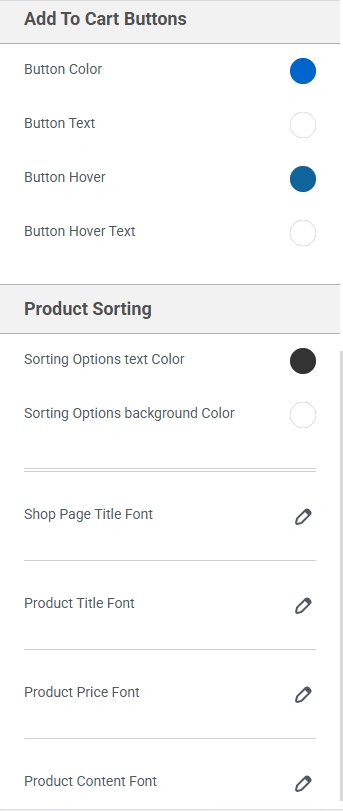
Add To Cart Buttons

  • Button Color: Set the background color of the button using the colour picker. 
  • Button Text: Set the text color of the “Add to Cart” button using the colour picker. 
  • Button Hover: Set the background color of the button when a user hovers over it using the colour picker. 
  • Button Hover Text: Set the text color of the button when a user hovers over it using the colour picker.  

Product Sorting

  • Sorting Options text Color: Set the color of the text in the sorting options dropdown using the colour picker.
  • Sorting Options background Color: Set the background color of the sorting options dropdown using the colour picker. 
  • Shop Page Title Font: Controls the font for the main title of the shop page.
  • Product Title Font: Controls the font for the title of each product.
  • Product Price Font: Controls the font for the product price.
  • Product Content Font: Controls the font for other product information and descriptions.

After changing a few colours and fonts, here are the results.

Updated on December 15, 2025

What are your Feelings

  • Happy
  • Normal
  • Sad

Share This Article :

  • Facebook
  • X
  • LinkedIn
  • Pinterest
Product CatalogWooCommerce Cart Options

Our Products

Responsive Pro

Responsive Addons for Elementor

Starter Templates

Responsive Blocks

WP Legal Pages

GDPR Cookie Consent

Powered by Responsive WordPress theme

Our Products

Responsive Pro

Responsive Addons for Elementor

Starter Templates

Responsive Blocks

WP Legal Pages

GDPR Cookie Consent

Powered by Responsive WordPress theme

Resources

Starter Templates

Responsive Platform

Learn Elementor

Testimonials

Compare Astra/Kadence

TrustPilot

CCPA

Video Tutorials

Resources

Starter Templates

Responsive Platform

Learn Elementor

Testimonials

Compare Astra/Kadence

TrustPilot

CCPA

Video Tutorials

Theme Features

Responsive Features

WooCommerce

Header Footer Builder

Site Builder

Child Theme Generator

Download Free Theme

DFY Website Setup

Theme Features

Responsive Features

WooCommerce

Header Footer Builder

Site Builder

Child Theme Generator

Download Free Theme

DFY Website Setup

Company

About

Pricing

Blog

Brand Assets

Affiliate Program

Contact Us

Terms of Service

GDPR Privacy Policy

GDPR Cookie Policy

Website Design Service

Company

About

Pricing

Blog

Brand Assets

Affiliate Program

Contact Us

Terms of Service

GDPR Privacy Policy

GDPR Cookie Policy

Website Design Service

Support

Login

Whatโ€™s New

Documentation

Request Support

Video Tutorials

Refund Policy

Service

Discount Coupon

Bug Bounty Program

Support

Login

Whatโ€™s New

Documentation

Request Support

Video Tutorials

Refund Policy

Service

Discount Coupon

Bug Bounty Program

Copyright © 2010-2026 CyberChimpsย ย 

Copyright © 2010-2026 CyberChimpsย ย 

Top
Top