↓ Skip to Main Content
Cyberchimps Logo

Main Navigation

  • Products
    • Responsive Theme
    • Responsive Plus Plugin
    • Responsive Addons for Elementor
    • Responsive Blocks Plugin
  • Starter Templates
    • Free Templates
    • Premium Templates
  • For Agencies
  • Pricing
  • Login
Get Started
Cyberchimps Logo

Off Canvas Menu

  • Products
    • Responsive Theme
    • Responsive Plus Plugin
    • Responsive Addons for Elementor
    • Responsive Blocks Plugin
  • Starter Templates
    • Free Templates
    • Premium Templates
  • For Agencies
  • Pricing
  • Login

Modules & Settings

9
  • AI Suite in Responsive Pro
  • How to White Label Responsive Theme
  • Usage Tracking Policy
  • Create a Mega Menu with the Responsive Plus – Starter Templates Plugin
  • Custom Fonts
  • WooCommerce Module
  • Site Builder
  • How to Connect to New License If I Am An Old Responsive Pro User
  • Your Site Doesn’t Have A Default Kit

WooCommerce

5
  • Product Catalog
  • WooCommerce Product Catalog Options
  • WooCommerce Cart Options
  • WooCommerce Single Product
  • WooCommerce Module Overview
View Categories
  • Home
  • Docs
  • Responsive Plus - Starter Template
  • Modules & Settings
  • AI Suite in Responsive Pro

AI Suite in Responsive Pro

Before using the AI Suite, you must install and activate the Responsive Pro plugin.

AI Suite Settings 

To configure AI Writer, navigate to Responsive Pro > AI Suite
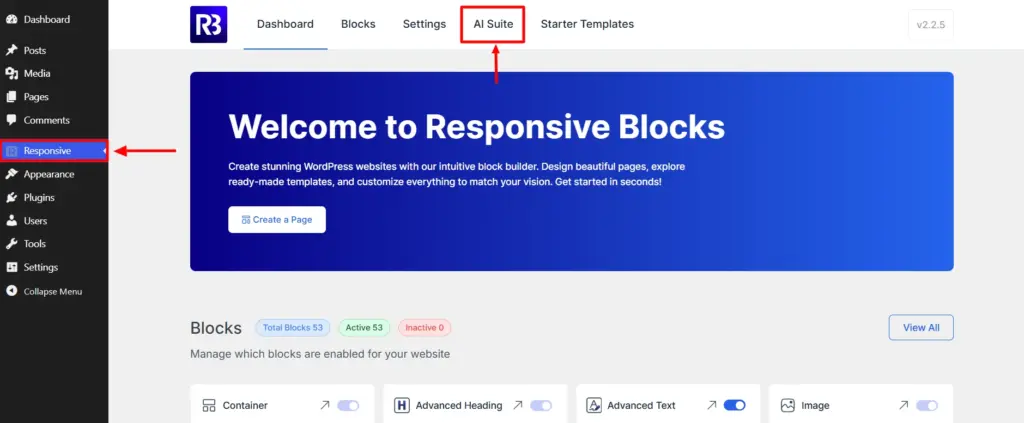
Navigate to AI Suite

AI Writer

This page lets you customize how the AI Writer behaves throughout your website.

  • Enable AI Writer – Turn on Enable AI Writer to activate AI-powered content generation inside the WordPress Block Editor.
  • Select Post Types – Choose where AI Writer should be available. You can choose between Posts, Pages or All Post Types.
  • User Role Access – Control which WordPress user roles can use the AI Writer. The available options are Editor and Admin.
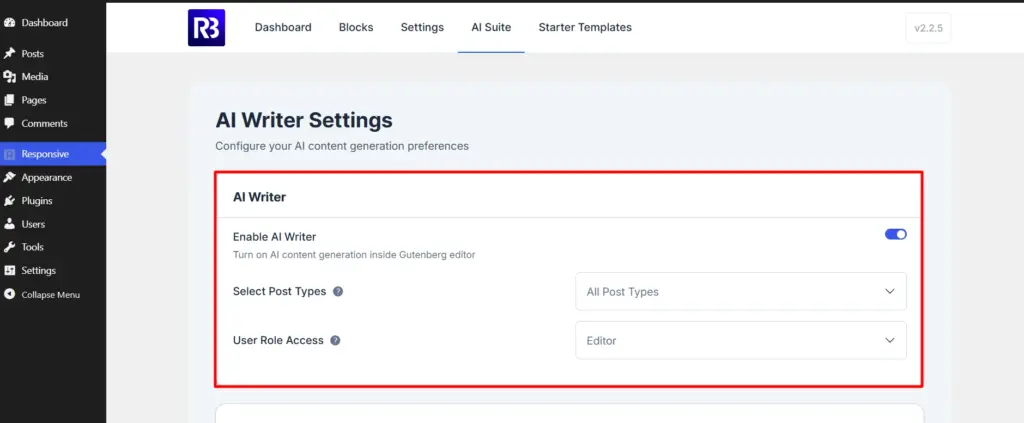
AI writer settings

Content Preference

Content Preferences define the default behavior of AI-generated content.

  • Context – Providing context helps generate content that’s more relevant and aligned with your brand.
  • Default Tone – Select the writing style AI should use by default. The available options are Informative, Casual, Friendly, Professional, and Inspirational. 
  • Default Length – Choose the default length of AI-generated content. Typical options include Short (5-15 words), Medium (20-30 words), Large (40-60 words), Big (80+ words).
  • Default Language – Select the language used for AI-generated content.
  • Max Tokens – Tokens determine the maximum length of the AI response.

After configuring the options, click Save Changes to apply your preferences.
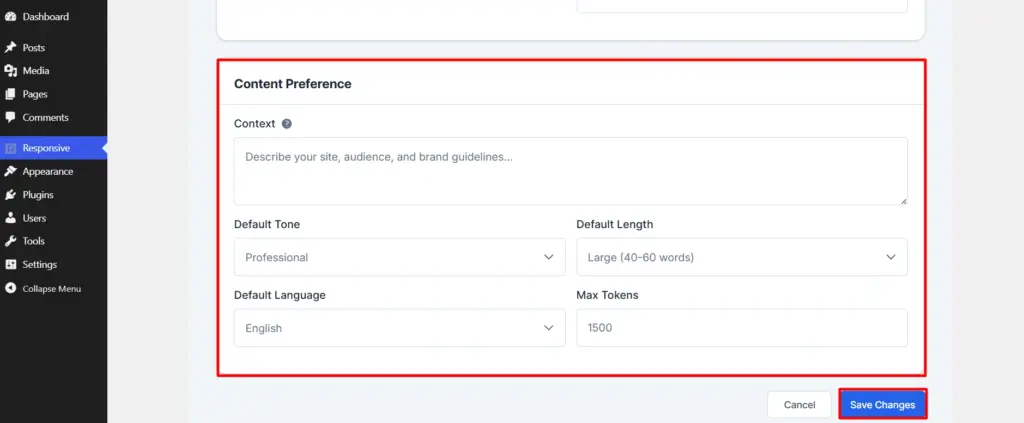
Content preferences

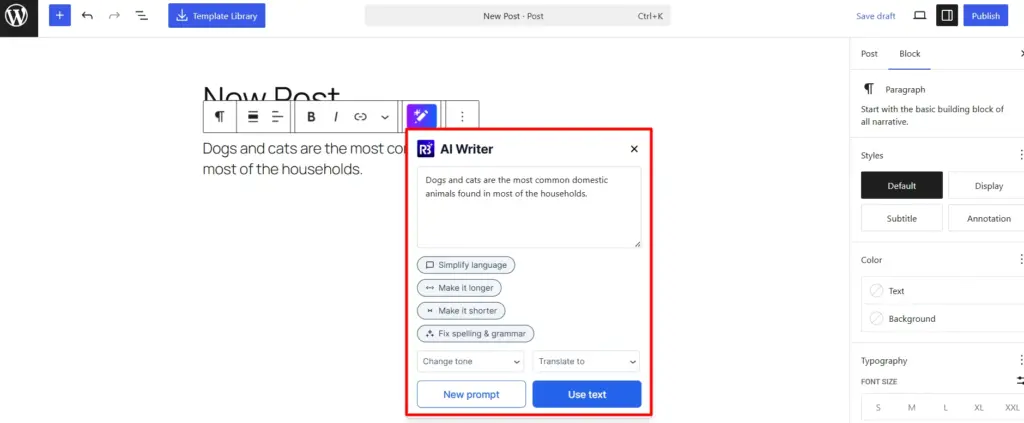
AI Writer in the Block Editor

  • Once your preferences are applied you can add the API key and choose your preferred AI tool. Make sure you are using paid version of your AI tool to make sure your API key runs smoothly.
  • After that you can generate and improve content directly inside the WordPress Block Editor.
  • Open any post or page and add a supported text block, such as a paragraph or heading block.
  • Select the text you want to edit, or place your cursor where you want to generate new content.
  • The AI Writer option will appear in the block toolbar.
  • From there, you can either use preset AI actions or enter your own custom prompt.
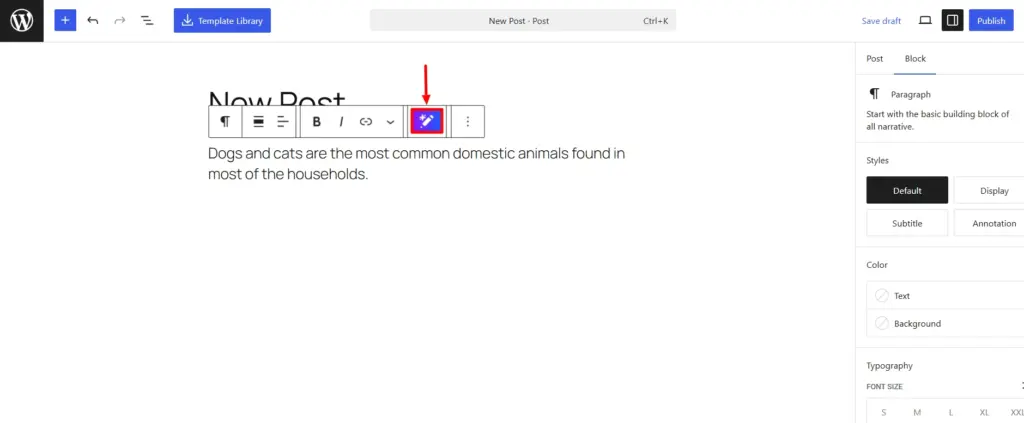
AI writer in the editor

Using Preset AI Actions

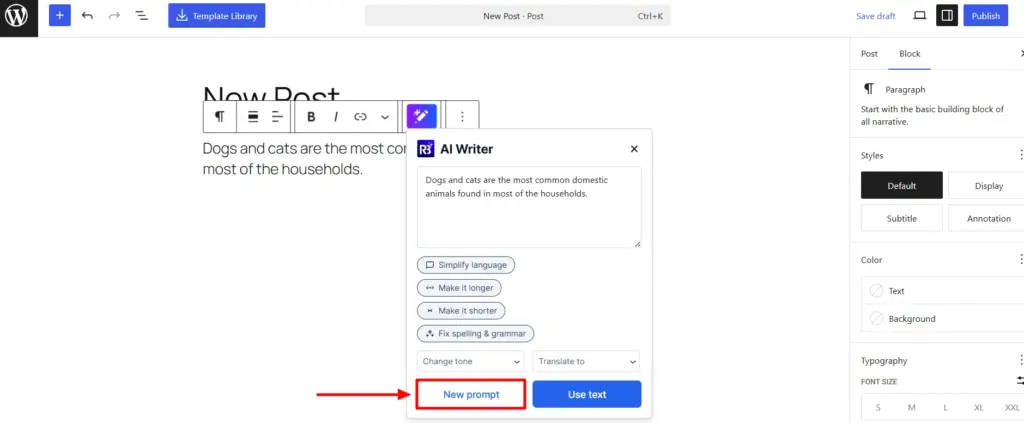
Preset actions allow you to quickly improve existing content without writing a prompt.

Common actions include:

  • Simplify Language
  • Make it longer
  • Make it shorter
  • Fix spelling and grammar
  • Change tone
  • Translate to
Preset AI actions

Using Custom Prompts

For more control, you can provide your own instructions. Select the content you want to modify and choose the AI Writer option.

Click New Prompt and enter a prompt describing exactly what you’d like the AI to do or choose from the suggested prompts.

You also get to change the length and tone of the generated AI content.
Generate Content from Scratch

You can also use AI Writer to create new content. Describe what you’d like to create and it will generate the content. However, please note that this feature works best with inline text and does not write a fully structured content for you.
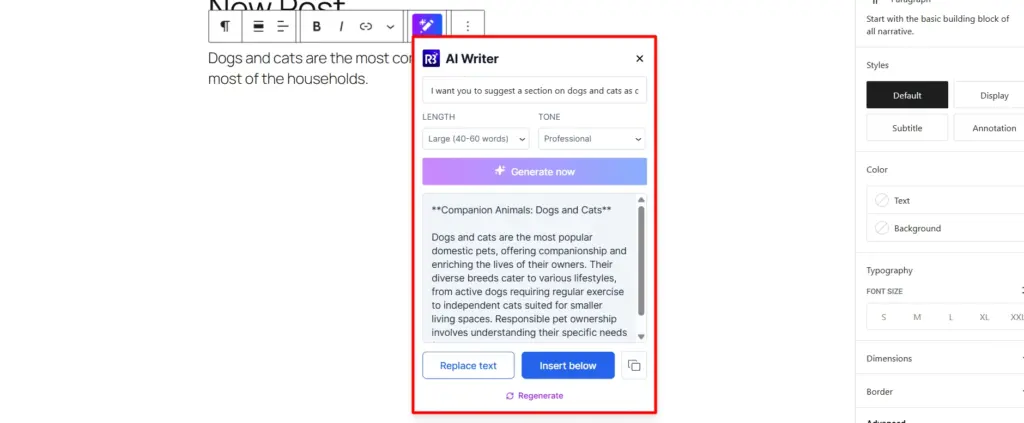
Adding new prompt for AI writer
Updated on July 9, 2026

What are your Feelings

  • Happy
  • Normal
  • Sad

Share This Article :

  • Facebook
  • X
  • LinkedIn
  • Pinterest
Your Site Doesn’t Have A Default KitHow to White Label Responsive Theme

Our Products

Responsive Paid Plan

Responsive Plus

Responsive Addons for Elementor

Starter Templates

Responsive Blocks

WP Legal Pages

GDPR Cookie Consent

Powered by Responsive WordPress theme

Our Products

Responsive Paid Plan

Responsive Plus

Responsive Addons for Elementor

Starter Templates

Responsive Blocks

WP Legal Pages

GDPR Cookie Consent

Powered by Responsive WordPress theme

Resources

Starter Templates

Responsive Platform

Learn Elementor

Testimonials

Compare Astra/Kadence

TrustPilot

CCPA

Video Tutorials

Resources

Starter Templates

Responsive Platform

Learn Elementor

Testimonials

Compare Astra/Kadence

TrustPilot

CCPA

Video Tutorials

Theme Features

Responsive Features

WooCommerce

Header Footer Builder

Site Builder

Child Theme Generator

Download Free Theme

DFY Website Setup

Theme Features

Responsive Features

WooCommerce

Header Footer Builder

Site Builder

Child Theme Generator

Download Free Theme

DFY Website Setup

Company

About

Pricing

Blog

Brand Assets

Affiliate Program

Contact Us

Terms of Service

GDPR Privacy Policy

GDPR Cookie Policy

Website Design Service

Company

About

Pricing

Blog

Brand Assets

Affiliate Program

Contact Us

Terms of Service

GDPR Privacy Policy

GDPR Cookie Policy

Website Design Service

Support

Login

Whatโ€™s New

Documentation

Request Support

Video Tutorials

Refund Policy

Service

Discount Coupon

Bug Bounty Program

Support

Login

Whatโ€™s New

Documentation

Request Support

Video Tutorials

Refund Policy

Service

Discount Coupon

Bug Bounty Program

Copyright © 2010-2026 CyberChimpsย ย 

Copyright © 2010-2026 CyberChimpsย ย 

Top
Top