
↓ Skip to Main Content
Cyberchimps Logo

Main Navigation

  • Pro
  • Starter Templates
    • Free Templates
    • Premium Templates
  • Pricing
  • Login
Get Started
Cyberchimps Logo

Off Canvas Menu

  • Pro
  • Starter Templates
    • Free Templates
    • Premium Templates
  • Pricing
  • Login

Templates

12
  • Setting Up – Video Tutorials
  • How To Add Templates To Your Favorites
  • Connection Failed To The License Key API Server
  • How to Import Responsive Plus – Starter Templates?
  • Fix: Error while connecting to your site. Invalid Domain
  • How to Import Readymade Section Blocks in Elementor
  • Cannot Find New Templates in the Starter Templates Library?
  • Starter Templates FAQs
  • How To Edit An Imported Starter Template In WordPress
  • How to Enable/Disable Responsive Plus – Starter Templates Modules
  • Getting Started with Responsive Starter Templates
  • Import a Single Page With Responsive Starter Templates
View Categories
  • Home
  • Docs
  • Responsive Starter Templates
  • Templates
  • Connection Failed To The License Key API Server

Connection Failed To The License Key API Server

Are you facing this error message, “ Connection Failed To The License Key API Server” 

It is because the Responsive Pro Plugin has been deprecated by Cyberchimps and no longer connects to the old licensing system.

What to do in this situation?

Responsive Plus is the enhanced version of Responsive Pro. It is done to enhance the functionalities and performance of the plugin.

Instead of installing two separate plugins, you need to install only one plugin, the Responsive Plus – Starter Templates plugin.

Steps to switch to Responsive Plus:

Delete or deactivate the Responsive Pro Plugin. Now, follow these steps:

  1. Install and activate Responsive Plus from your WordPress Dashboard.
Responsive plus
  1. From the Responsive theme, click on Settings > Connect your existing account.
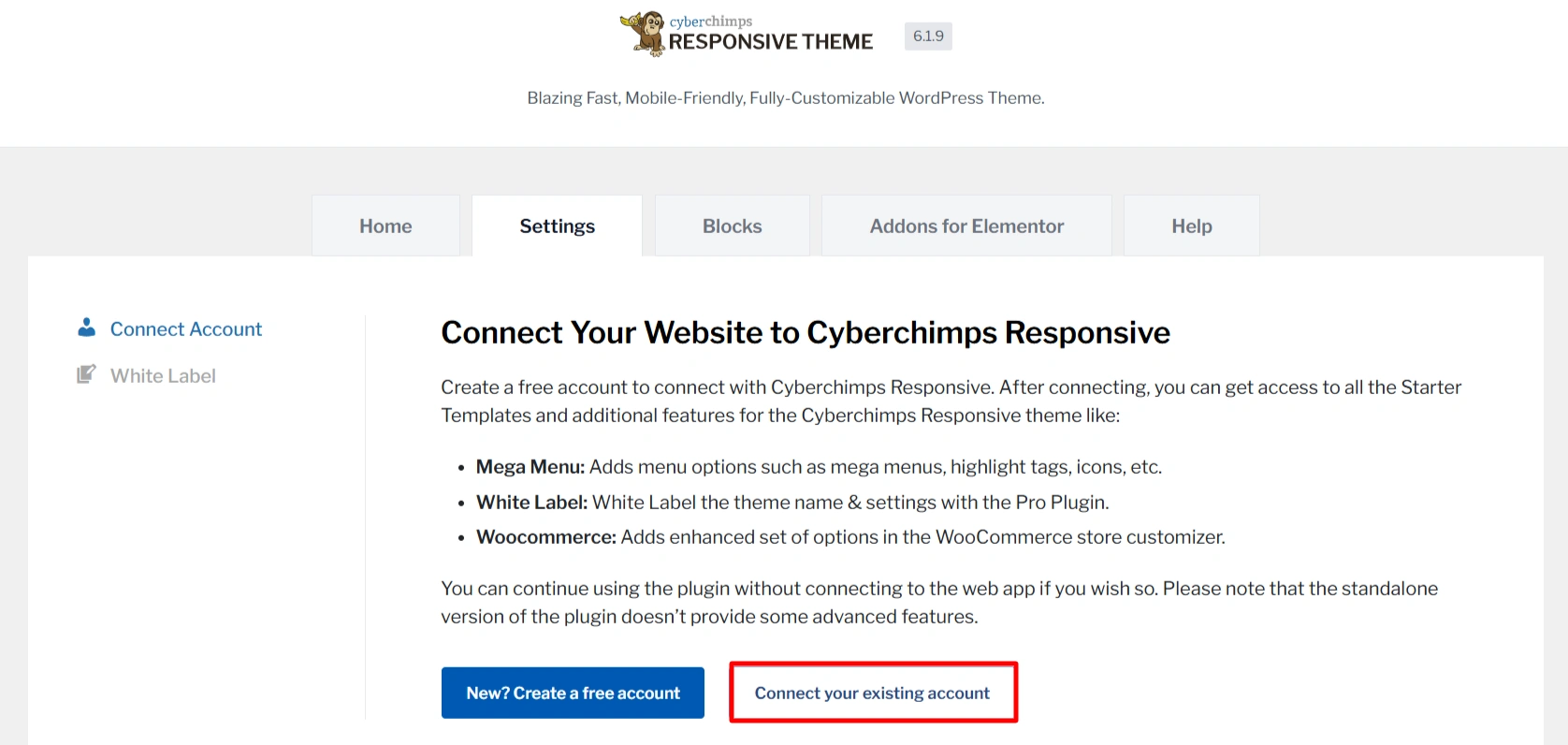
Coonect to existing account

When using Responsive Plus, you do not need to use the License Key API and can directly connect with your existing account. 

Will this affect your existing website or content?

No, when you make the switch to Responsive Plus with your existing account, all your current settings, the layouts, and the content remain intact. You can continue to work as before without any worries.

Updated on July 16, 2025

What are your Feelings

  • Happy
  • Normal
  • Sad

Share This Article :

  • Facebook
  • X
  • LinkedIn
  • Pinterest
How To Add Templates To Your FavoritesHow to Import Responsive Plus – Starter Templates?

Our Products

Responsive Pro

Responsive Addons for Elementor

Starter Templates

Responsive Blocks

WP Legal Pages

GDPR Cookie Consent

Powered by Responsive WordPress theme

Our Products

Responsive Pro

Responsive Addons for Elementor

Starter Templates

Responsive Blocks

WP Legal Pages

GDPR Cookie Consent

Powered by Responsive WordPress theme

Resources

Starter Templates

Responsive Platform

Learn Elementor

Testimonials

Compare Astra/Kadence

TrustPilot

CCPA

Video Tutorials

Resources

Starter Templates

Responsive Platform

Learn Elementor

Testimonials

Compare Astra/Kadence

TrustPilot

CCPA

Video Tutorials

Theme Features

Responsive Features

WooCommerce

Header Footer Builder

Site Builder

Child Theme Generator

Download Free Theme

DFY Website Setup

Theme Features

Responsive Features

WooCommerce

Header Footer Builder

Site Builder

Child Theme Generator

Download Free Theme

DFY Website Setup

Company

About

Pricing

Blog

Brand Assets

Affiliate Program

Contact Us

Terms of Service

GDPR Privacy Policy

GDPR Cookie Policy

Website Design Service

Company

About

Pricing

Blog

Brand Assets

Affiliate Program

Contact Us

Terms of Service

GDPR Privacy Policy

GDPR Cookie Policy

Website Design Service

Support

Login

What’s New

Documentation

Request Support

Video Tutorials

Refund Policy

Service

Discount Coupon

Bug Bounty Program

Support

Login

What’s New

Documentation

Request Support

Video Tutorials

Refund Policy

Service

Discount Coupon

Bug Bounty Program

Copyright © 2010-2026 CyberChimps  

Copyright © 2010-2026 CyberChimps  

Top
Top