Summary
Selecting a SEO optimized WordPress theme is not just about selecting a theme that represents an attractive design.
Here, I have completed the analysis of five different SEO-based themes available through the WordPress.org repository. It includes ST SEO Agency, SEOKart, Ploto, Bizvita, and SEO Expert.
Most best SEO WordPress theme articles recommend the same handful of themes. The problem is that very few explain how those recommendations were made.
Some rely on reputation. Some rely on affiliate commissions. Others simply repeat what competing articles already say.
That doesn’t help agencies choosing a theme for client projects or business owners investing in a website they’ll use for years.
To get a clearer answer, we benchmarked six popular WordPress themes using the same evaluation criteria: Core Web Vitals, theme footprint, mobile responsiveness, accessibility, and maintenance health.
This report shows the testing framework, methodology, and results so you can make a decision based on data rather than assumptions.
- TL;DR: What Is the Best SEO WordPress Theme?
- Why Most Best SEO Theme Lists Get It Wrong
- How We Tested These WordPress Themes
- Why These Five Metrics Matter for SEO
- Benchmark Results
- 1. Responsive Theme
- 2. GeneratePress
- 3. Kadence
- 4. Blocksy
- 5. Hello Elementor
- 6. OceanWP
- Which SEO WordPress Theme Should You Choose?
- FAQ
- Conclusion
Cyberchimps Responsive is the Best WordPress Theme – Get it for free
TL;DR: What Is the Best SEO WordPress Theme?
There is no universally best SEO WordPress theme. The right choice depends on performance, accessibility, maintenance quality, and your specific use case.
We benchmarked six popular WordPress themes:
- Responsive
- Kadence
- Blocksy
- Hello Elementor
- OceanWP
- Generatepress
Each theme was evaluated using the same scoring framework. Instead of relying on feature lists or popularity, this benchmark focuses on measurable SEO-related factors that affect how a WordPress site performs over time.
Why Most Best SEO Theme Lists Get It Wrong
Most SEO theme rankings are based on reputation, feature comparisons, or affiliate recommendations. Very few use consistent testing or publish measurable performance data.
Search for “best SEO WordPress themes” and you’ll notice a pattern.
The same themes appear again and again. That doesn’t automatically make those recommendations wrong. But it does raise an important question: How were those conclusions reached?
Most Rankings Are Based on Reputation, Not Data
The common approach is straightforward. A publisher reviews a theme’s:
- Features
- Customization options
- Templates
- Integrations
- Popularity
Then they assign a ranking. This works reasonably well if you’re evaluating design flexibility or ease of use.
It’s much less useful when the goal is to determine which theme provides the strongest SEO foundation.
A theme can have thousands of positive reviews and still ship more CSS, more JavaScript, or more requests than a competing option.Without testing, those differences remain hidden.
Why We Built This Benchmark
Most website owners are not choosing between a good theme and a bad theme.They’re choosing between several good themes. That’s what makes the decision difficult.
When six themes all claim to be lightweight, SEO-friendly, and optimized for performance, feature comparisons stop being useful.
A benchmark creates a common standard. By evaluating every theme against the same criteria and under the same conditions, we can compare outcomes rather than marketing claims.
The goal isn’t to prove that one theme is perfect. The goal is to understand the tradeoffs each theme makes and identify which themes deliver the strongest SEO foundation based on measurable data.
How We Tested These WordPress Themes
Every theme was tested under the same conditions to reduce variables and make the results comparable.
To maintain consistency, each theme was evaluated using:
- The same hosting environment
- The same WordPress version
- The same PHP version
- The same content structure
- The same images
- The same homepage layout
- The same testing tools
This approach helps isolate the impact of the theme itself rather than external factors.
Many SEO theme comparisons focus almost entirely on speed. Speed matters, but it’s only one piece of the puzzle. A theme can load quickly while creating accessibility issues. Another may score well in performance tests but have a larger footprint than competitors.
Scoring Framework
Each category was weighted according to its relative impact on SEO readiness and website performance.
| Category | Weight | Why It Matters |
| Core Web Vitals | 40% | Directly impacts user experience and performance |
| Theme Footprint | 25% | Influences loading behavior and resource usage |
| Mobile Responsiveness | 15% | Supports mobile-first indexing and usability |
| Accessibility | 10% | Improves usability and semantic quality |
| Maintenance Health | 10% | Reduces long-term technical risk |
Core Web Vitals received the highest weighting because they provide the clearest measurement of real-world performance.
The remaining categories help paint a broader picture of what makes a WordPress theme SEO-friendly over time.
Why These Five Metrics Matter for SEO
A WordPress theme influences technical SEO through performance, mobile usability, accessibility, and code quality. These factors affect how users experience your website and how efficiently search engines can process it.
You won’t find a Google SEO score for WordPress themes.
Google doesn’t publish one. Instead, it rewards websites that load quickly, work well on mobile devices, provide a good user experience, and follow modern web standards. Your theme contributes to all of those areas.
That’s why this benchmark focuses on five measurable criteria instead of feature lists.
1. Why Core Web Vitals matter
Core Web Vitals measure how users experience your website as it loads and becomes interactive.
Metrics such as Largest Contentful Paint (LCP), Interaction to Next Paint (INP), and Cumulative Layout Shift (CLS) reveal whether visitors are waiting for content, struggling with delayed interactions, or dealing with unstable layouts.
A theme with unnecessary assets or inefficient rendering can make those metrics worse before you install a single plugin.
For agencies and businesses managing dozens of websites, that overhead compounds quickly.
2. Why mobile responsiveness matters
Most visitors will see your website on a phone before they see it on a desktop. Google follows the same approach through mobile-first indexing.
Responsive layouts, readable typography, touch-friendly navigation, and consistent spacing all contribute to a better mobile experience. A theme that requires extensive manual fixes increases development time and maintenance costs.
That’s especially important for freelancers and agencies trying to deliver projects on schedule.
3. Why theme, CSS, and JavaScript footprint matter
Every stylesheet and script adds weight to a page. Some are necessary. Some aren’t.
Themes that load large CSS bundles or JavaScript files by default can increase page size and HTTP requests before any content or third-party plugins are added.
A smaller footprint gives you more flexibility later when your website grows.
4. Why accessibility matters
Accessibility improves the experience for everyone.
Clear heading structures, semantic HTML, keyboard navigation, and meaningful markup help people using assistive technologies navigate a website with confidence.
They also create cleaner document structures that search engines can process more effectively.
Accessibility isn’t a separate checklist that only large organizations should worry about. It’s part of building a high-quality website.
5. Why theme updates matter
WordPress changes constantly. Themes need to keep pace.
Regular updates improve compatibility with new WordPress releases, address security issues, and fix bugs that can affect performance or stability.
An actively maintained theme also signals that users can expect continued support as the platform evolves.
That’s one reason update cadence forms part of this benchmark instead of focusing only on speed tests.
By evaluating all five areas together, the benchmark provides a broader picture of technical quality than any single performance score or PageSpeed report can deliver.
Benchmark Results
Every theme in this comparison is evaluated against the same five criteria using an identical testing methodology.
- This section brings everything together.
- The methodology is fixed.
- The scoring criteria are fixed.
- The testing environment is fixed.
That consistency makes it easier to compare themes on equal terms and identify the trade-offs between them.
Core Web Vitals comparison
The first benchmark measures loading performance and visual stability.
| Theme | LCP | INP | CLS |
| Responsive | 1.74 sec | 24 msec | 0 |
| GeneratePress | 1.32 sec | 8 msec | 0 |
| Kadence | 1.45 sec | 8 msec | 0 |
| Blocksy | 1.6 sec | 16 msec | 0 |
| Hello Elementor | 1.52 sec | 8 msec | 0 |
| OceanWP | 2.91 sec | 16 msec | 0 |
Theme, CSS, and JavaScript footprint comparison
The second benchmark measures how much code each theme loads before additional plugins or customizations are introduced.
| Theme | CSS Size | JavaScript Size | HTTP Requests | Total Page Size |
| Responsive | 35.4 kb | 0.9 kb | 9 | 76 kb |
| GeneratePress | 35.4 kb | 0.9 kb | 6 | 25 kb |
| Kadence | 35.4 kb | 0.9 kb | 9 | 41 kb |
| Blocksy | 35.4 kb | 0.9 kb | 7 | 58 kb |
| Hello Elementor | 35.4 kb | 0.9 kb | 7 | 18 kb |
| OceanWP | 35.4 kb | 0.9 kb | 22 | 326 kb |
Mobile responsiveness comparison
Mobile responsiveness extends beyond shrinking content to fit a smaller screen.
| Theme | Responsive Layout | Readability – Typography & Spacing | Mobile Navigation Usability |
| Responsive | Pass | Pass | Pass |
| GeneratePress | Pass | Pass | Pass |
| Kadence | Pass | Pass | Pass |
| Blocksy | Pass | Pass | Pass |
| Hello Elementor | Pass | Pass | Pass |
| OceanWP | Pass | Pass | Pass |
Accessibility comparison
| Theme | Semantic HTML | Heading Structure | Focus States |
| Responsive | Pass | Pass | Pass |
| GeneratePress | Pass | Pass | Pass |
| Kadence | Pass | Pass | Pass |
| Blocksy | Pass | Pass | Pass |
| Hello Elementor | Pass | Pass | Pass |
| OceanWP | Pass | Pass | Pass |
Theme update comparison
Long-term maintenance matters when you’re building websites expected to last for years.
| Theme | Last Update | Latest WordPress Compatibility | Active Installs |
| Responsive | May 26, 2026 | 6.3.7 | 20,000+ |
| GeneratePress | December 1, 2025 | 6.5 | 500,000+ |
| Kadence | May 12, 2026 | 6.3 | 500,000+ |
| Blocksy | May 29, 2026 | 6.5 | 300,000+ |
| Hello Elementor | May 20, 2026 | 6.0 | 1+ million |
| OceanWP | May 20, 2026 | 5.6 | 500,000+ |
1. Responsive Theme
Responsive theme combines a lightweight codebase with solid technical fundamentals, making it a practical choice for agencies, freelancers, and business owners who want a fast starting point without giving up flexibility.
The theme focuses on the basics. The benchmark reflects that philosophy.
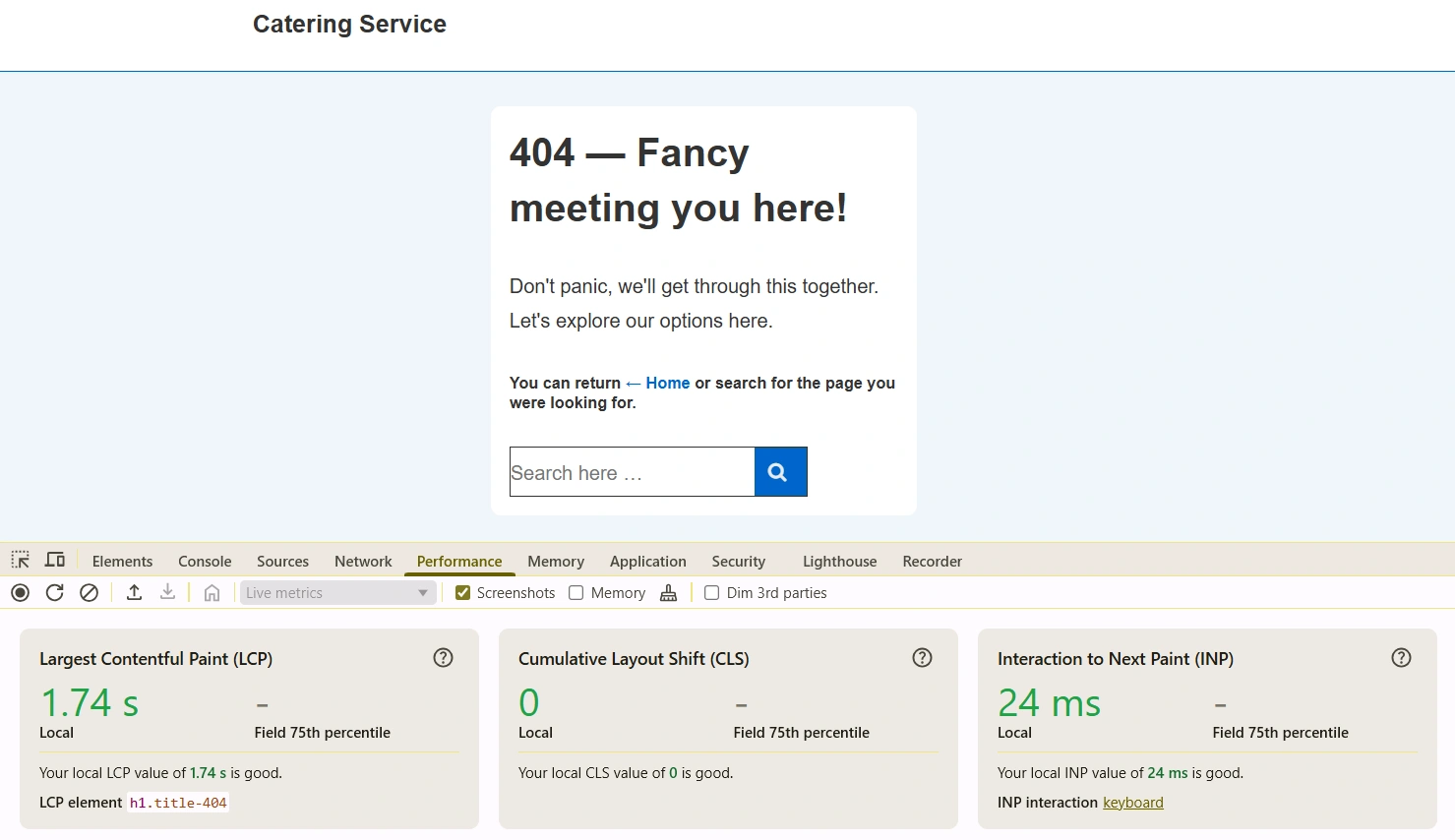
Theme Scores:
- Largest Contentful Paint (LCP): 1.74 seconds
- Interaction to Next Paint (INP): 24 milliseconds
- Cumulative Layout Shift (CLS): 0
- HTTP requests: 9
- Total page size: 76kb
The theme also passed every mobile responsiveness and accessibility check included in this comparison.
Trade-offs
Responsive delivers a balanced profile without introducing obvious weaknesses across the measured categories.
That consistency becomes more meaningful as projects grow and additional plugins, templates, and custom functionality are added.
Best For
Responsive is a strong fit for:
- Agencies building multiple client websites with a repeatable workflow.
- Freelancers who want a lightweight foundation that works with Elementor and the Block Editor.
- Small businesses launching professional websites without custom development.
- Solopreneurs who prefer starting with templates instead of designing pages from scratch.
This is a pre-designed starter template that you can get with Responsive Plus and customize using Responsive Theme.
The benchmark shows a theme that performs consistently across performance, usability, and maintenance metrics without depending on a single standout number to justify its position.
2. GeneratePress
GeneratePress delivered the strongest raw performance numbers in this benchmark. Its combination of a fast Largest Contentful Paint, low HTTP requests, and lightweight footprint makes it a compelling choice for performance-focused websites.
GeneratePress has built its reputation around clean code and efficiency. The benchmark supports that reputation.
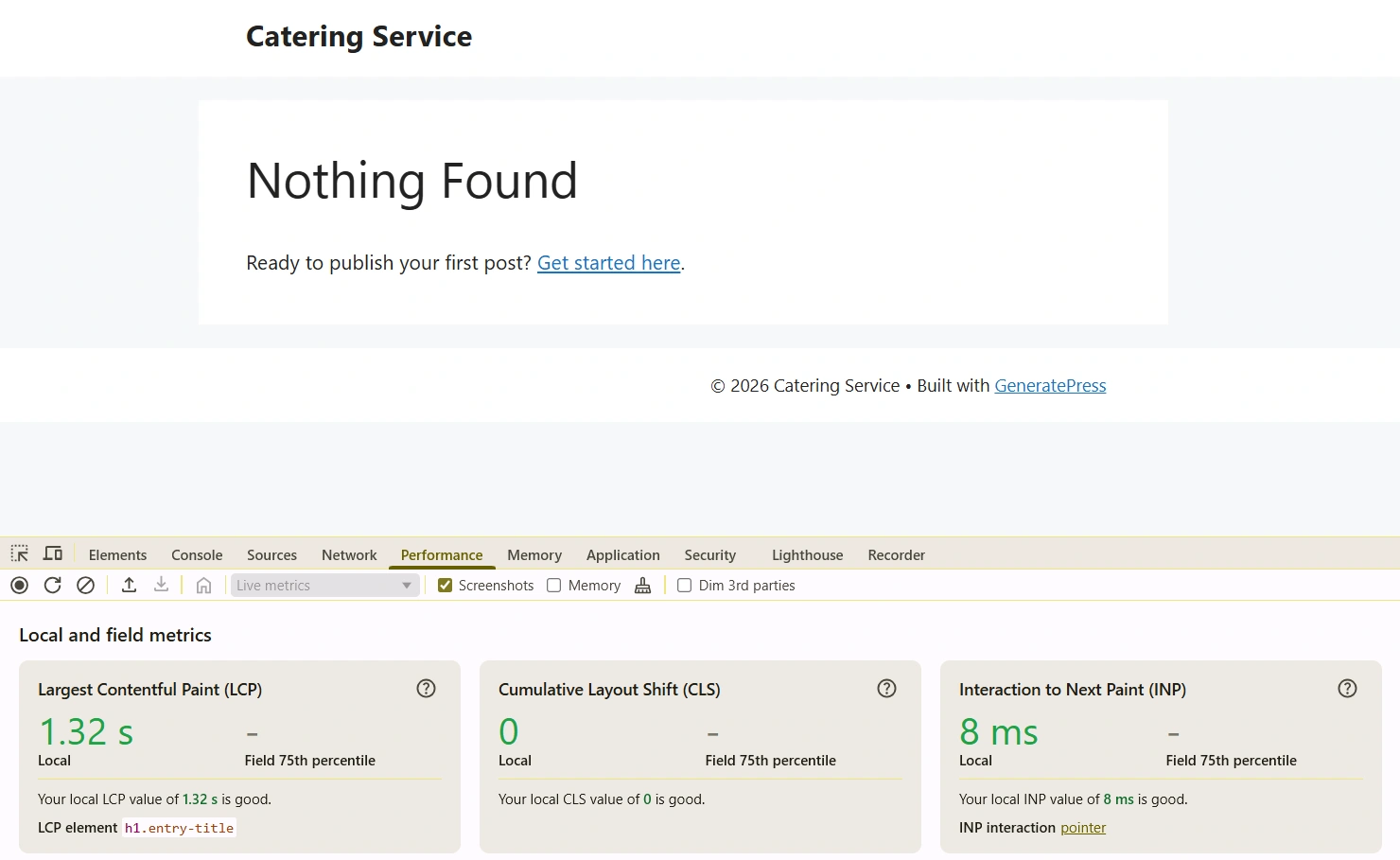
Theme Scores:
- Largest Contentful Paint (LCP): 1.32 seconds
- Interaction to Next Paint (INP): 8 milliseconds
- Cumulative Layout Shift (CLS): 0
- HTTP requests: 6
- Total page size: 25 kb
Those numbers place it among the strongest performers in this comparison.
Trade-offs
GeneratePress prioritizes speed and simplicity.
That works well for developers and agencies comfortable building custom experiences, but beginners may find themselves relying on additional tools or templates to speed up the design process.
Its latest listed compatibility in this benchmark is WordPress 6.5, and the recorded update date is December 1, 2025. Users planning long-term projects should always verify the latest changelog before deployment.
Best For
GeneratePress is a strong choice for:
- Agencies that prioritize frontend performance.
- Freelancers comfortable customizing layouts.
- Developers who prefer starting with a minimal foundation.
- Businesses where page speed is a primary consideration.
- Website owners who want a lightweight theme with broad community adoption.
Based on this benchmark, GeneratePress stands out for its measured loading performance and efficient asset delivery while maintaining passing scores across the mobile responsiveness and accessibility checks.
3. Kadence
Kadence strikes a balance between performance and customization. It posted strong Core Web Vitals scores in this benchmark while maintaining a lightweight footprint and passing every mobile responsiveness and accessibility check.
Kadence has become a popular choice for agencies, freelancers, and growing businesses because it combines design flexibility with respectable performance.
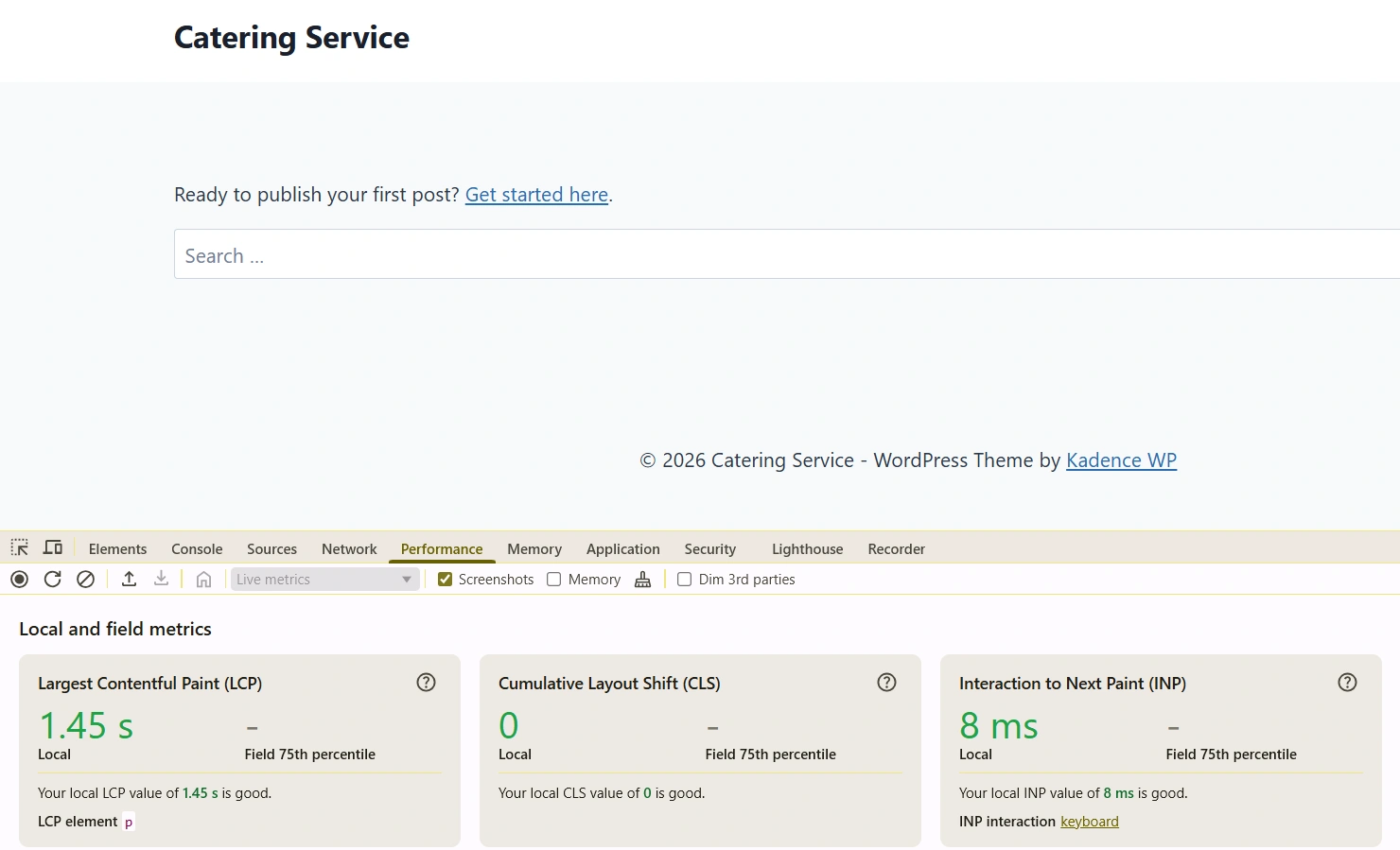
Theme Scores:
- Largest Contentful Paint (LCP): 1.45 seconds
- Interaction to Next Paint (INP): 8 milliseconds
- Cumulative Layout Shift (CLS): 0
- HTTP requests: 9
- Total page size: 41 kb
Those figures place it among the strongest overall performers in this comparison.
Trade-offs
If your primary objective is achieving the lowest measured baseline footprint, then the other themes have an advantage over Kadence in their respective categories.
Kadence instead delivers an even mix of speed, customization potential, and ongoing maintenance without any obvious weaknesses across the measured criteria.
Best For
Kadence is well suited for:
- Agencies balancing performance with design flexibility.
- Freelancers building websites across multiple industries.
- Small businesses that want room to customize without introducing significant baseline overhead.
- Website owners who value an actively maintained theme with broad adoption.
The benchmark positions Kadence as a well-rounded option that performs consistently across all five evaluation areas rather than relying on a single standout metric.
4. Blocksy
Blocksy delivers a strong mix of performance and modern WordPress development features. In this benchmark, it achieved good Core Web Vitals scores while maintaining a relatively small footprint and passing every mobile responsiveness and accessibility check.
Blocksy has gained popularity by embracing the block editor without losing sight of performance.
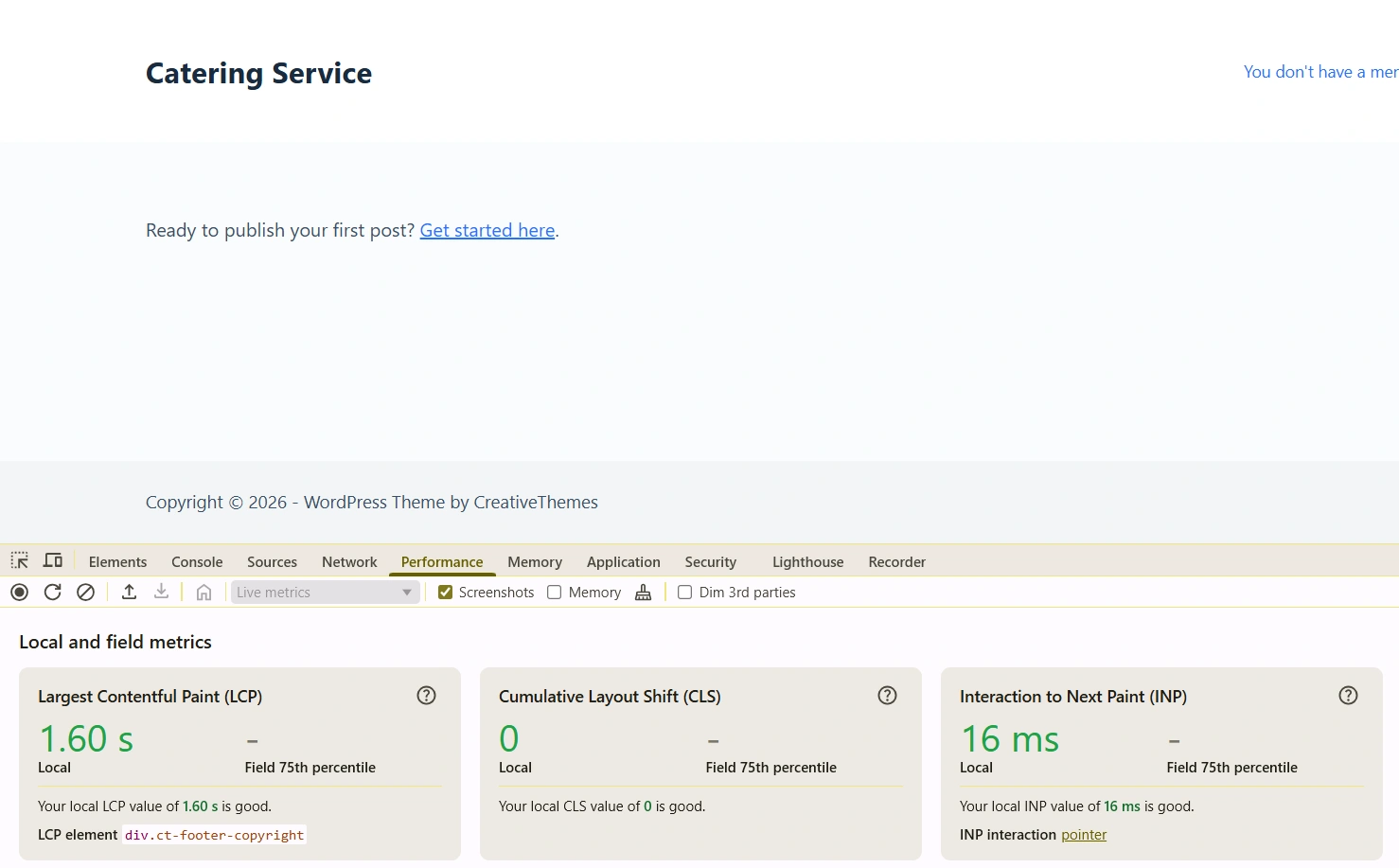
Theme Scores:
- Largest Contentful Paint (LCP): 1.60 seconds
- Interaction to Next Paint (INP): 16 milliseconds
- Cumulative Layout Shift (CLS): 0
- HTTP requests: 7
- Total page size: 58 kb
Those results position it comfortably among the better-performing themes in this comparison.
Trade-offs
While Blocksy performs well across the board, its 58 KB total page size is larger than those measured for Hello Elementor, GeneratePress, and Kadence.
Similarly, both GeneratePress and Kadence recorded faster Largest Contentful Paint values during testing.
That doesn’t make Blocksy slow.
Instead, it illustrates an important takeaway from this benchmark: different themes make different trade-offs between functionality and baseline footprint.
Best For
Blocksy is a good fit for:
- Agencies building modern WordPress websites with the Block Editor.
- Freelancers looking for a balance between flexibility and performance.
- Small businesses that want a fast-loading website without extensive optimization.
- Developers who value an actively maintained theme with a relatively lean baseline.
The benchmark shows Blocksy delivering consistently good results across every measured category, making it a dependable option for users who want performance without sacrificing modern WordPress capabilities.
5. Hello Elementor
Hello Elementor is the lightest theme in this benchmark by total page size, making it an attractive option for websites built entirely with Elementor. However, its true performance depends heavily on the page builder and widgets added on top of it.
Unlike traditional multipurpose themes, it provides a minimal foundation for Elementor users to build almost every aspect of a website using the page builder itself.
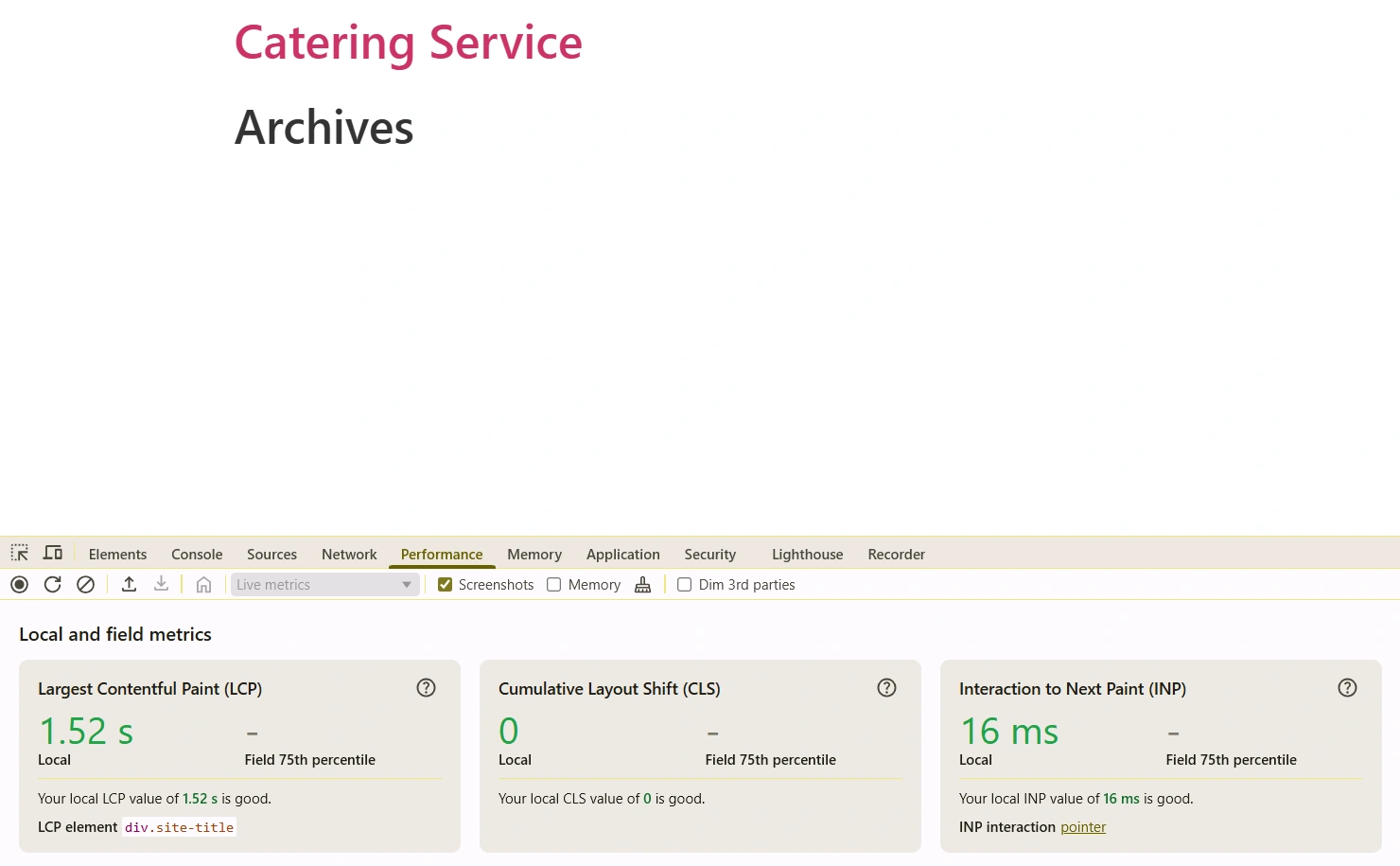
Theme Scores:
- Largest Contentful Paint (LCP): 1.52 seconds
- Interaction to Next Paint (INP): 8 milliseconds
- Cumulative Layout Shift (CLS): 0
- HTTP requests: 7
- Total page size: 18 kb
Among all six themes tested, Hello Elementor produced the smallest total page size, giving it the lowest baseline footprint in this comparison.
Trade-offs
As layouts become more complex and additional widgets, animations, and third-party add-ons are introduced, performance increasingly depends on how Elementor is used rather than on the underlying theme itself.
In other words, Hello Elementor gives you an extremely lightweight starting point, but the final outcome is largely determined by what you build on top of it.
That’s an important distinction when comparing it with more feature-rich themes.
Best for
Hello Elementor is an excellent choice for:
- Agencies that build every page with Elementor.
- Freelancers already invested in the Elementor ecosystem.
- Developers who want the lightest possible starting point for custom Elementor projects.
- Businesses planning to design their website primarily through Elementor templates and widgets.
The benchmark highlights Hello Elementor’s biggest advantage: an exceptionally small baseline footprint. Just remember that once you start adding Elementor sections and third-party widgets, overall performance will depend as much on your page-building choices as it does on the theme itself.
6. OceanWP
OceanWP offers extensive customization options and a mature ecosystem, but this benchmark shows it carries a significantly larger baseline footprint than the other themes tested. For performance-conscious websites, that’s an important trade-off to consider.
OceanWP has been a popular WordPress theme for years. Its appeal is easy to understand.
It supports a wide range of website types, integrates with popular page builders, and provides plenty of customization options out of the box.
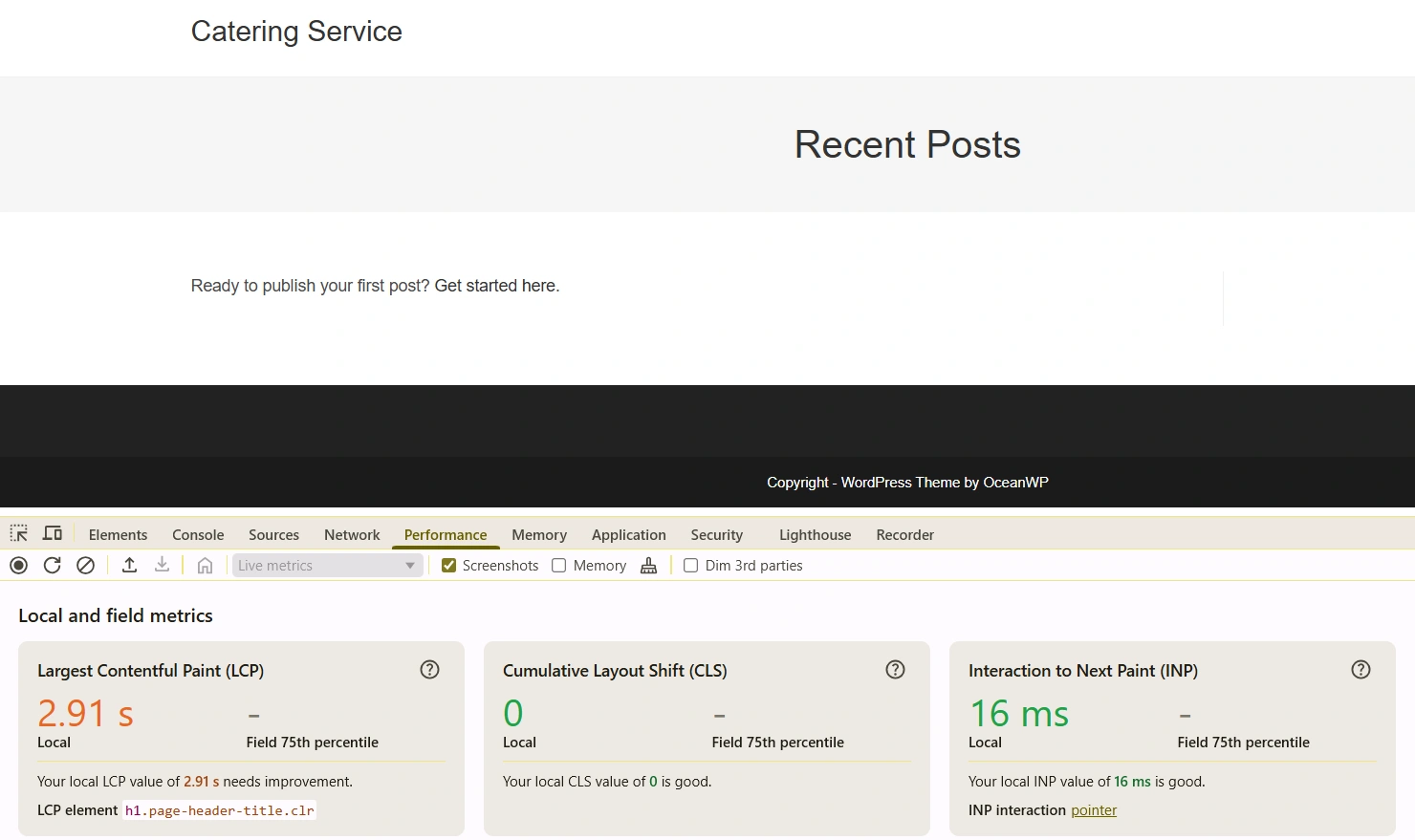
Theme Scores:
- Largest Contentful Paint (LCP): 2.91 seconds
- Interaction to Next Paint (INP): 16 milliseconds
- Cumulative Layout Shift (CLS): 0
- HTTP requests: 22
- Total page size: 326 kb
Those numbers make it the heaviest theme in this comparison by a considerable margin.
Trade-offs
For agencies managing multiple client websites or businesses where loading speed is a priority, that extra overhead may require additional optimization work after launch.
One of the biggest takeaways from this benchmark is that flexibility and performance don’t always move in the same direction.
OceanWP offers plenty of capabilities, but it also starts with the largest baseline payload in this comparison. If your goal is maximizing performance with minimal optimization effort, the lighter alternatives tested in this guide may provide a stronger starting point.
Best for
OceanWP is best suited for:
- Website owners who value extensive customization options.
- Agencies already invested in the OceanWP ecosystem.
- Businesses willing to trade a larger baseline footprint for additional built-in functionality.
- Users planning to fine-tune performance through caching and optimization strategies after development.
Which SEO WordPress Theme Should You Choose?
After comparing six Tier 1 themes across Core Web Vitals, page weight, accessibility, mobile responsiveness, and maintenance, one thing becomes clear.
There isn’t a universal winner. Every theme makes trade-offs. The key is choosing the one that matches your workflow rather than chasing a single benchmark number.
Here are my final recommendations:
Final Recommendations Based On Audience
| Audience | Recommended Theme | Why to Choose |
| WordPress agencies | Responsive or GeneratePress | Lightweight foundations that support scalable client workflows. |
| Freelancers | Kadence or GeneratePress | Strong balance between performance and customization. |
| Solopreneurs | Responsive | Starter templates and flexible customization reduce technical barriers. |
| Elementor-first users | Hello Elementor | Extremely small baseline footprint designed specifically for Elementor projects. |
| Block Editor users | Blocksy | Modern architecture with consistently good benchmark results. |
| Users prioritizing customization | OceanWP | Extensive flexibility, provided you’re prepared to optimize performance. |
The biggest takeaway from this benchmark isn’t that one theme beats every other option.
It’s that the best SEO WordPress theme is the one that aligns with your project goals while giving you a clean, maintainable technical foundation to build on.
FAQ
The best SEO WordPress theme is one that delivers fast loading times, clean code, mobile responsiveness, accessibility, and regular updates.
Yes, a WordPress theme indirectly affects SEO by influencing page speed, mobile usability, accessibility, and overall technical performance.
Yes, because an SEO-friendly theme provides the technical foundation while an SEO plugin manages metadata, sitemaps, schema, and other optimization features.
For most agencies, GeneratePress, Responsive, and Kadence provide the best balance of performance, flexibility, and long-term maintainability.
Conclusion
After conducting the tests here’s the bigger takeaway.
No theme will rank your website. A fast theme can’t rescue thin content. A lightweight codebase won’t replace a solid internal linking strategy.
And perfect Core Web Vitals won’t compensate for pages that don’t satisfy search intent.
Your theme is the foundation and not the finished building.
Choose a theme that gets the fundamentals right, then invest the rest of your effort where it matters most: creating useful content, improving user experience, and continuously optimizing your website as it grows.
That’s a strategy that will still be relevant long after the next SEO-friendly theme hits the market.
I hope this article helped you find the best WordPress theme for your business website. If it did, don’t forget to check our other articles: