
The Responsive Addons for Elementor Product Meta widget displays key details about the product, including its name, price, availability, images, reviews, and related items. It facilitates the user’s decision-making process and supports e-commerce goals by enabling product information access, social sharing, and seamless addition to the shopping cart.
How to Add the Product Meta Widget?
To add Product Meta widget on your product page, follow these simple steps:
- Go to WordPress Dashboard > Pages > Add New Page.

- Click the Edit with Elementor button to add the Product Meta widget.

- Search by Product Meta and use the widget that has the RAE Badge.
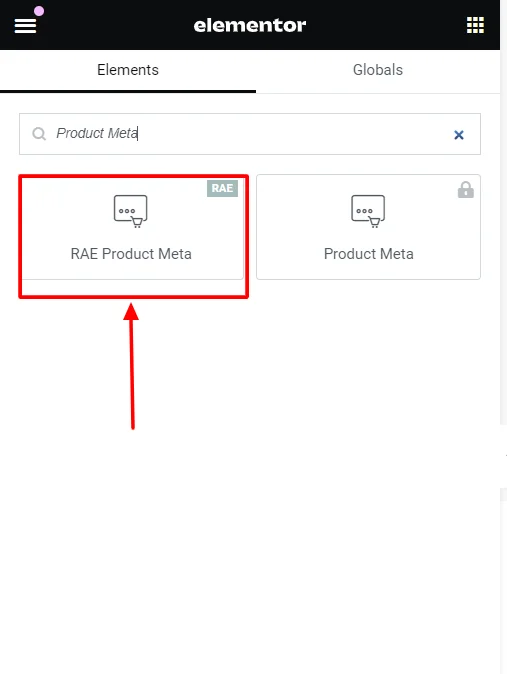
- Drag and drop the RAE Product Meta widget onto your product page.
How to Customize the Product Meta Widget?
The Product Meta widget allows you to customize the style and captions. Upon adding the Product Meta widget, it allows you to edit the following parts:
Style
Under the widget styling options, you can edit the following:
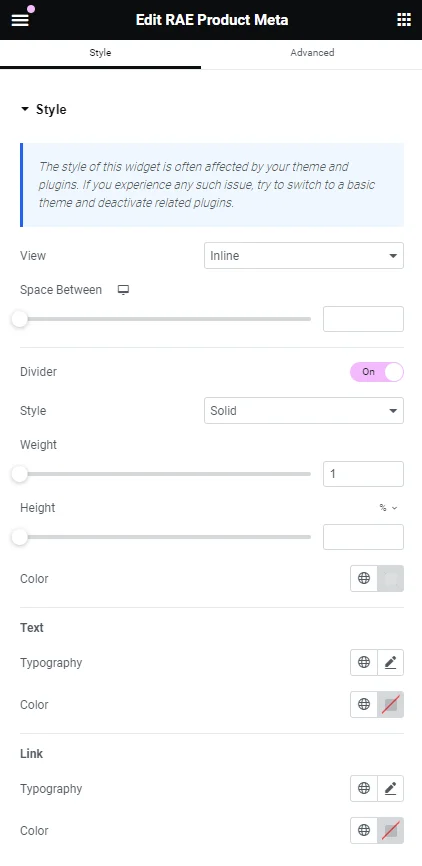
- View: Allows you to select the layout or style in which the product meta information is displayed. (e.g., table, inline, or stacked)
- Space Between: Adjust the spacing between different meta-information elements.
- Divider: Toggle to turn a divider line between meta-information elements on or off.
- Style: Set the style of the divider line (solid, dashed, dotted, etc.).
- Weight: Adjust the thickness of the divider.
- Height: Set the height of the divider.
- Color: Change the color of the divider line.
- Text:
- Typography: Customize the text settings for meta-information labels.
- Color: Adjust the text color of meta information text.
- Link:
- Typography: Customize the typography of links within the meta information.
- Color: Adjust the link color within the meta information.
Captions
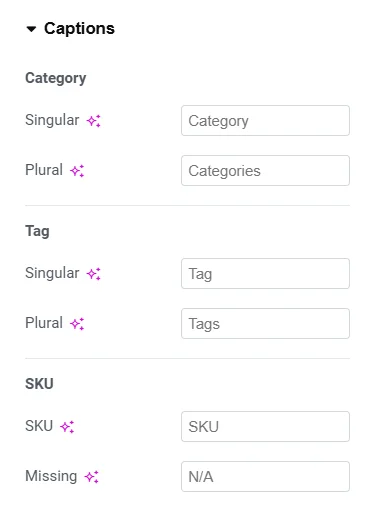
- Category:
- Singular: Set the label text for a single category.
- Plural: Set the label text for multiple categories.
- Tag:
- Singular: Set the label text for a single tag.
- Plural: Set the label text for multiple tags.
- SKU:
- Singular: Sets the label text for a single SKU.
- Plural: Sets the label text for multiple SKUs.


